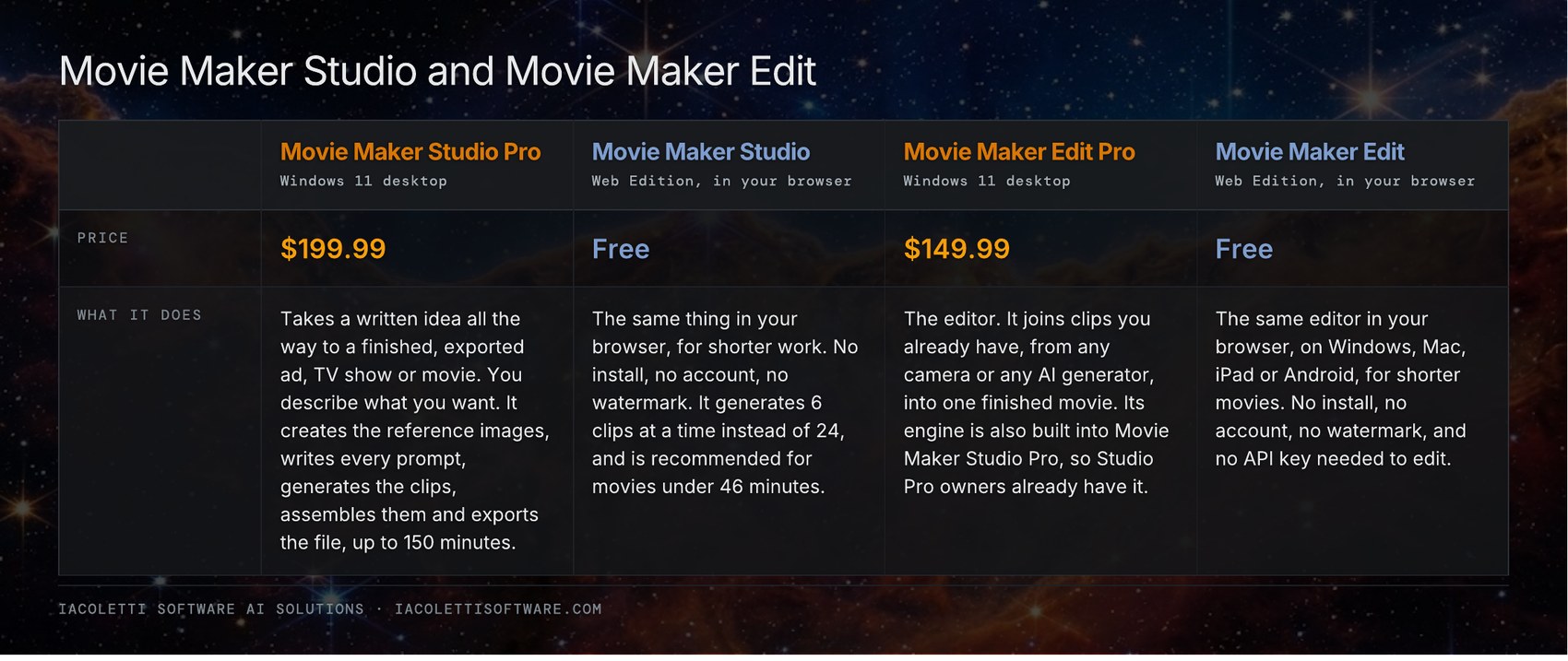
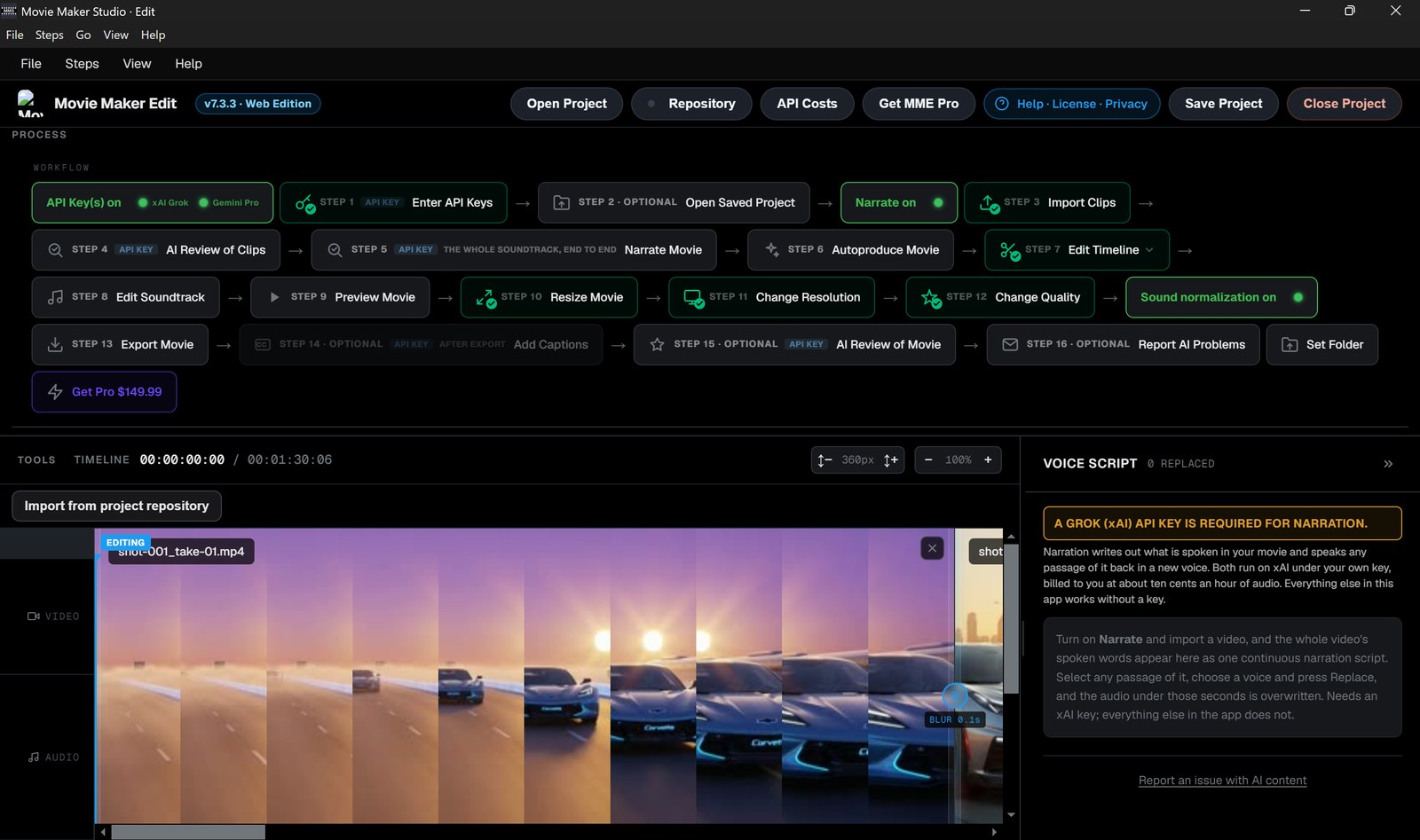
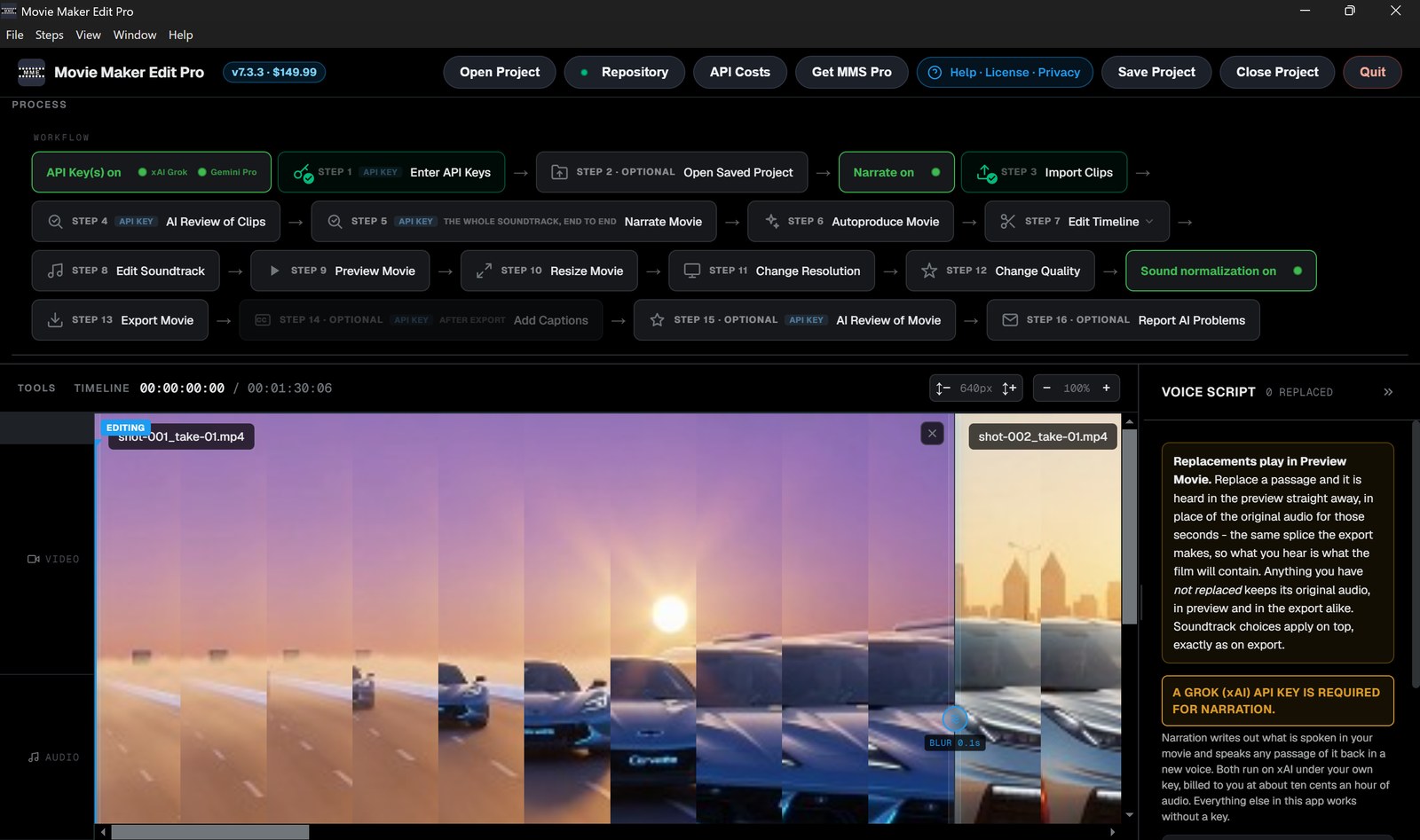
✂️Movie Maker Edit Pro, $149.99 is the editor: it joins clips you already have into one finished movie. Its engine is also built into Movie Maker Studio Pro, so Studio Pro owners already have it.
📊Both Movie Maker Studio and Movie Maker Edit are also available in free versions, so you can try before you buy. How the paid and free editions compare:
More
🍿 To demonstrate the awesome power of Movie Maker Studio Pro in action, watch BASIL (2026)(feature movie · 2:58:52) on There’s An AI For That or on X. To see what Movie Maker Edit Pro does with clips you already have, watch Alternative Dimensions (2026)(feature movie · 1:21:37) on There’s An AI For That or on X.
Iacoletti Software AI Solutions - Movie Making Software, Hard Science Fiction Books, and Free AI Apps
1. Movie Maker Studio Pro, Desktop Edition v7.4 - A Windows desktop application that takes a written idea all the way to a finished, exported ad, TV show or movie
Movie Maker Studio Pro 7.4, Desktop Edition, turns a written description into a finished ad, TV show or movie. No crew. No cast. No camera. No permission, and no skill: describing what you want is the whole job.
You start with your own xAI API key, which pays for the clip production, 6 to 15 second image to video clips, and a short description of what you want to make. Movie Maker Studio takes it from there. It shoots the reference images, writes every prompt, generates the clips on Grok Imagine, assembles them and exports the finished file as MP4, MOV or WebM, at any length up to 150 minutes.
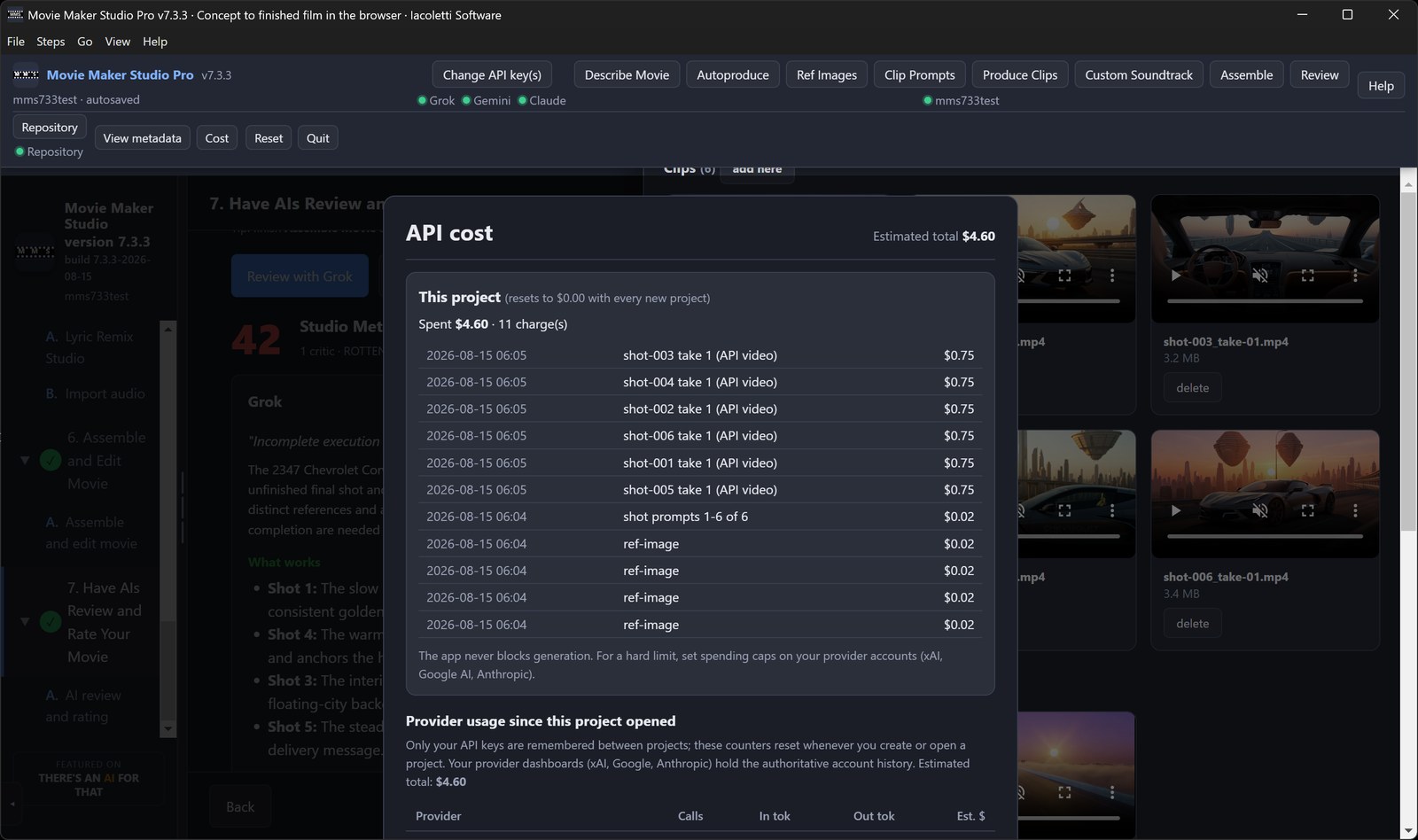
Describe the piece on one screen. Press Auto-produce. Get a finished, exported ad, TV show or movie. It shoots the reference images, writes every shot prompt, generates the clips, approves them, cuts the timeline, normalizes the audio and exports the file. Every stage surfaces a live progress bar and a running cost meter, so you know what has been done and what is still in flight without going looking for it.
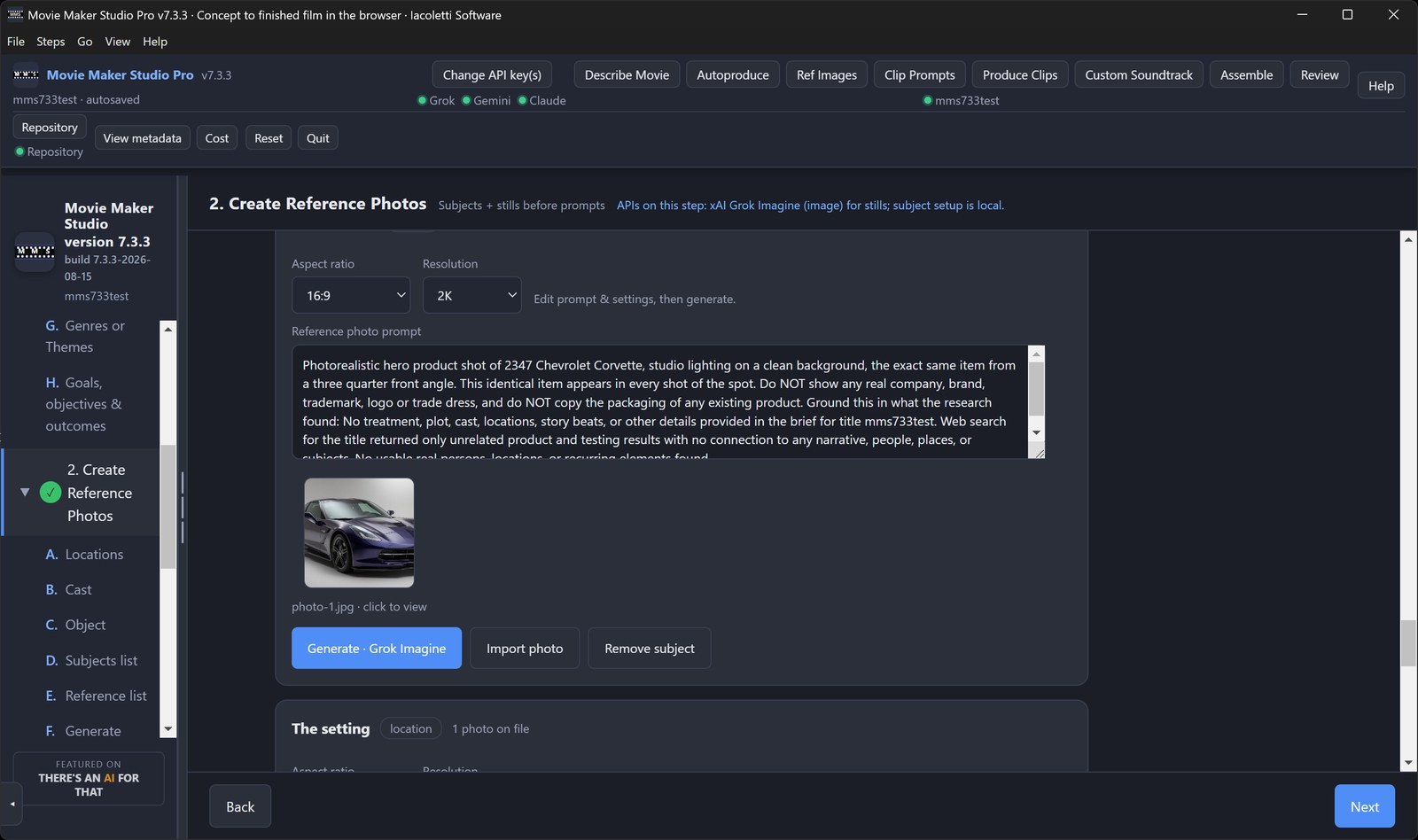
You never face a blank page. You choose instead: story blueprints, each carrying its own story structure, along with genres, themes, ending strategies, character archetypes, historical eras and presets matched to real broadcast and social runtimes. Reference images are what hold the movie together. The same face, the same car and the same room appear in every shot, so continuity becomes a property of the pipeline rather than a lucky accident. Every production goes out on the live web first and researches the subject you entered, so the detail in it is real. An optional stage adds a soundtrack composed for your production, with lyrics written for it.
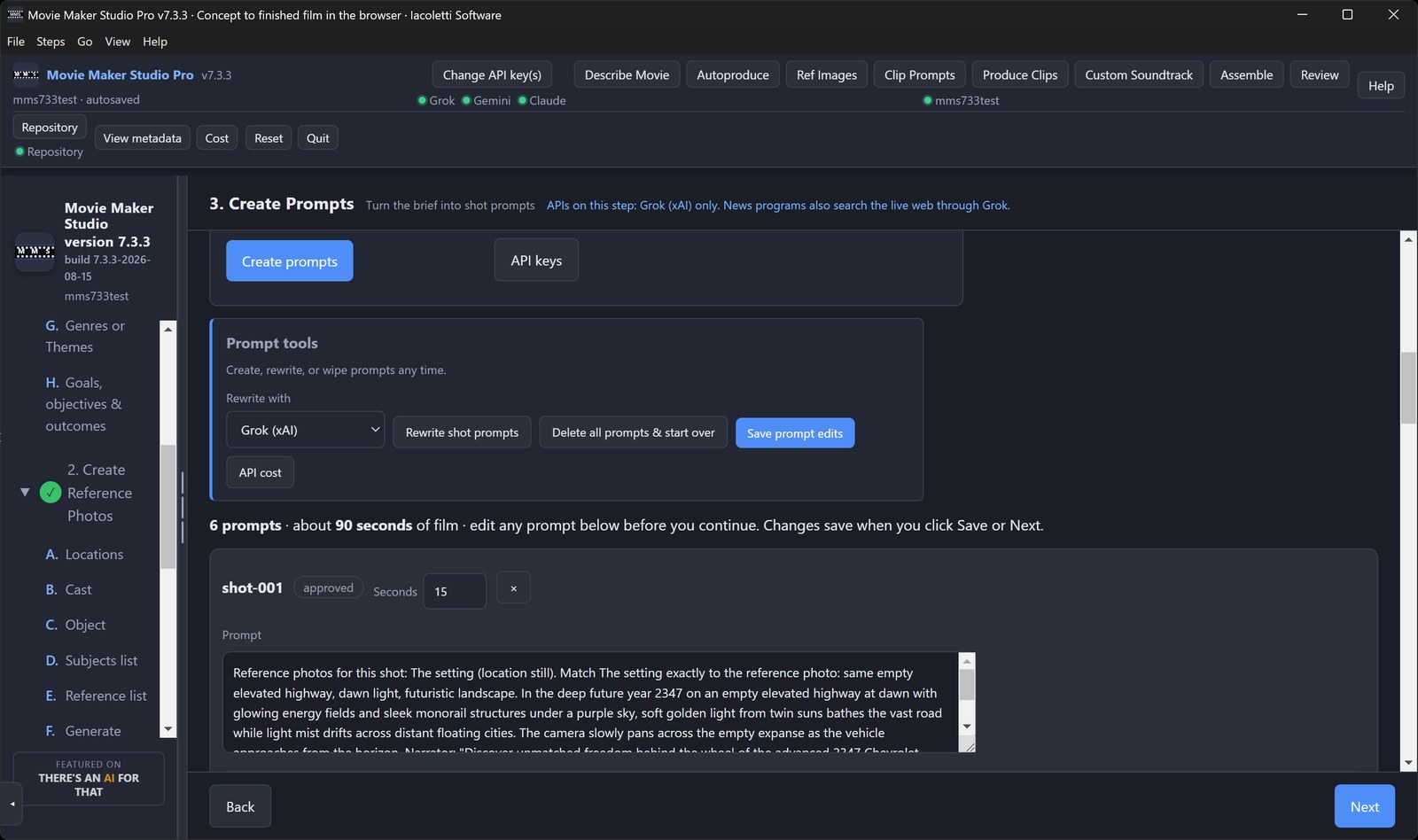
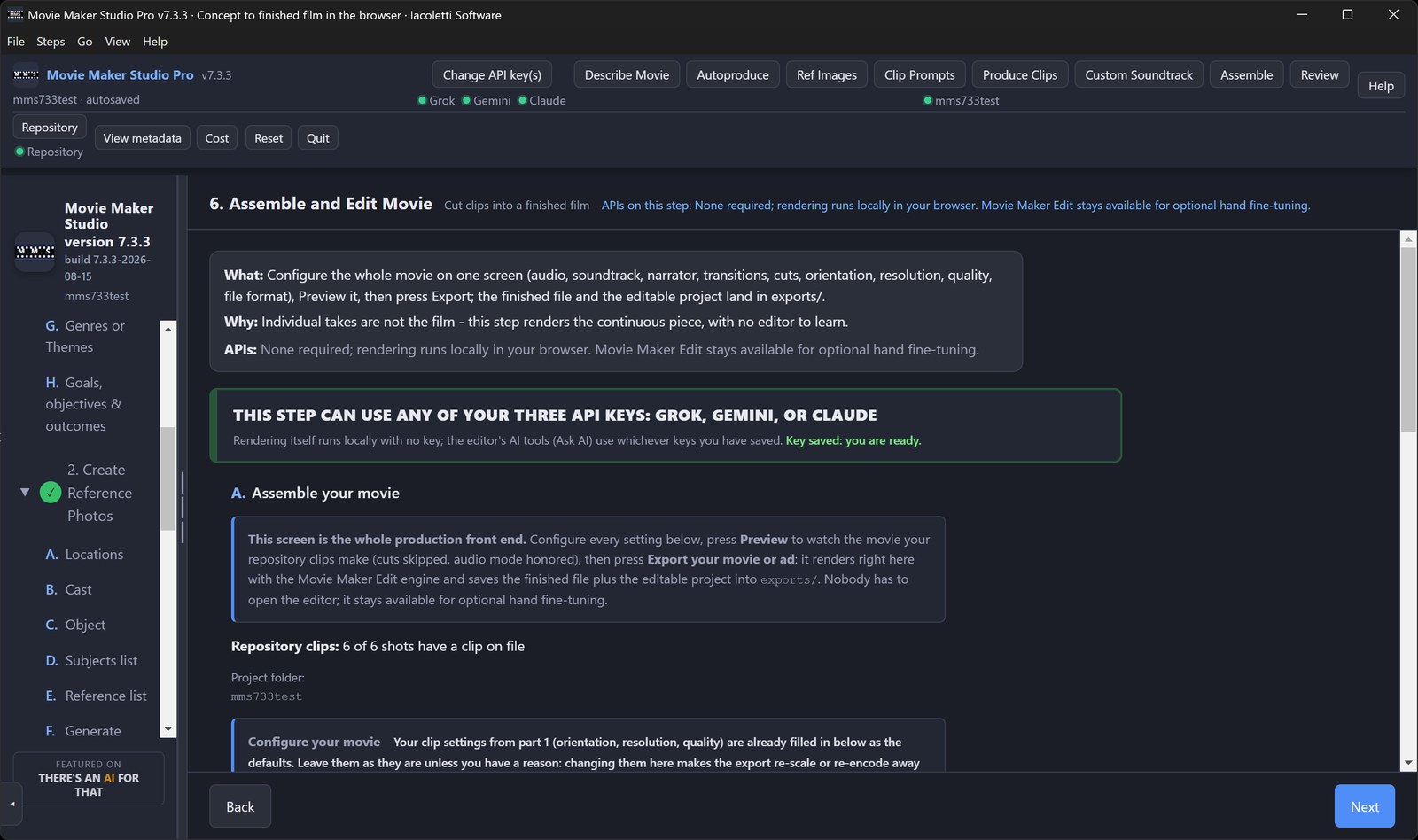
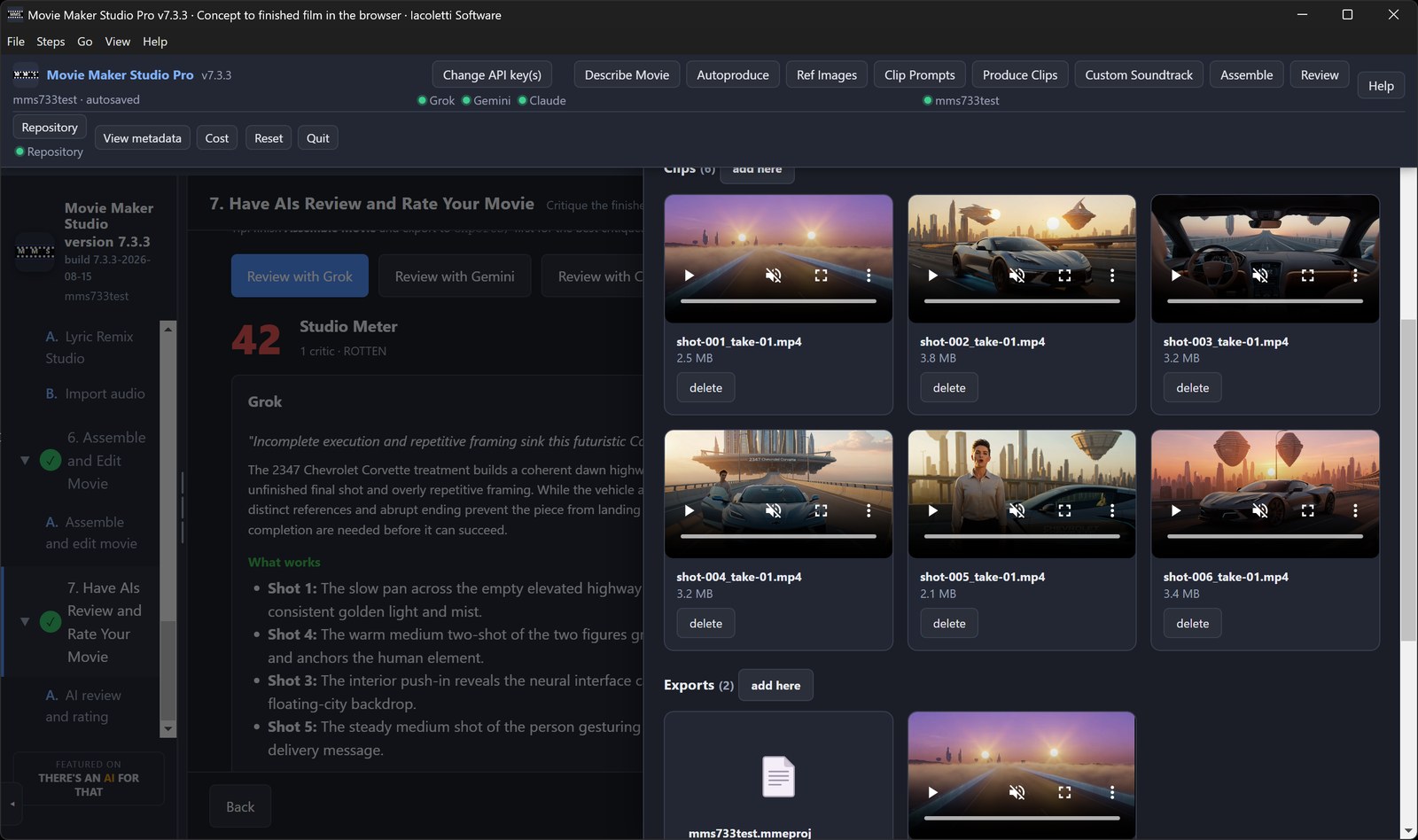
Prefer to drive it yourself? A seven step manual path stays available at every moment. Edit any prompt, regenerate individual clips, assign specific reference images per shot, and control transitions, audio mix, resolution and quality. Switch between automatic and manual freely, mid-production. Nothing is locked once Auto-produce has run. Finished videos open in the Movie Maker Edit timeline built into the app, so you keep cutting without leaving the product.
An optional review pass puts three independent AI critics on your finished cut. They score it, flag problems shot by shot and hand you rewritten prompts ready to regenerate.
A free browser based edition is there to try before you buy, for shorter ads, TV shows and movies. The difference is parallelism. A browser tab cannot reach your graphics hardware and cannot hold a long timeline in memory, so it generates 6 clips at once and stops at 46 minutes. This Windows edition puts your machine's cores and GPU behind the work, with hardware acceleration on NVIDIA, AMD and Intel graphics, and generates 24 clips at once, which is 24 simultaneous camera setups. No production crew on earth can do that, and it is what makes it fast: a full episode is shot in a handful of rounds rather than one take after another, so you can make videos faster than you can watch them, all the way to 150 minutes. Movie Maker Studio Pro, Desktop Edition, is $199.99 once, in the Microsoft Store and on Gumroad and Lemon Squeezy.
REQUIRES YOUR OWN API KEY. An xAI key is required; Google and Anthropic keys are optional. Generation is billed by those providers directly to your accounts.
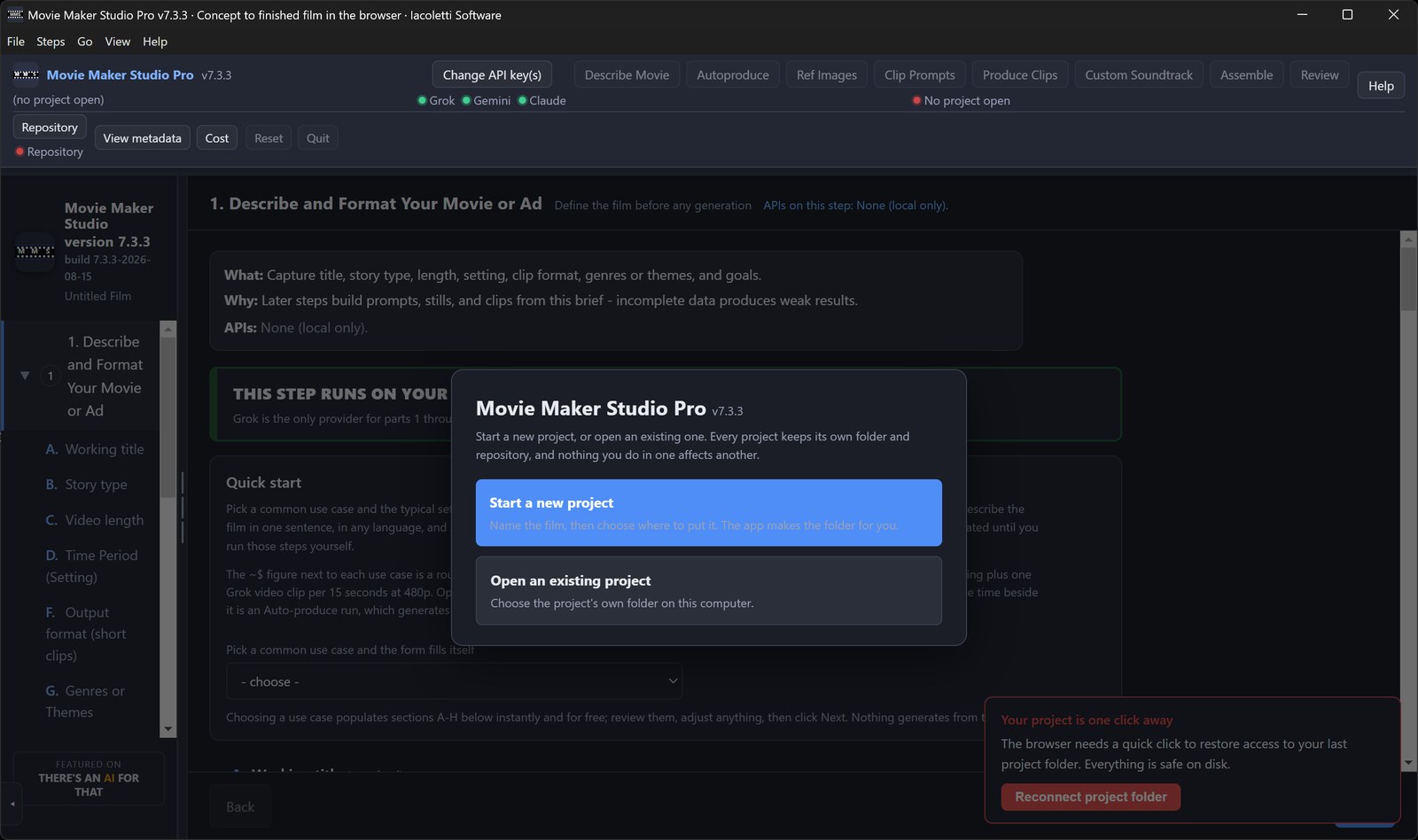
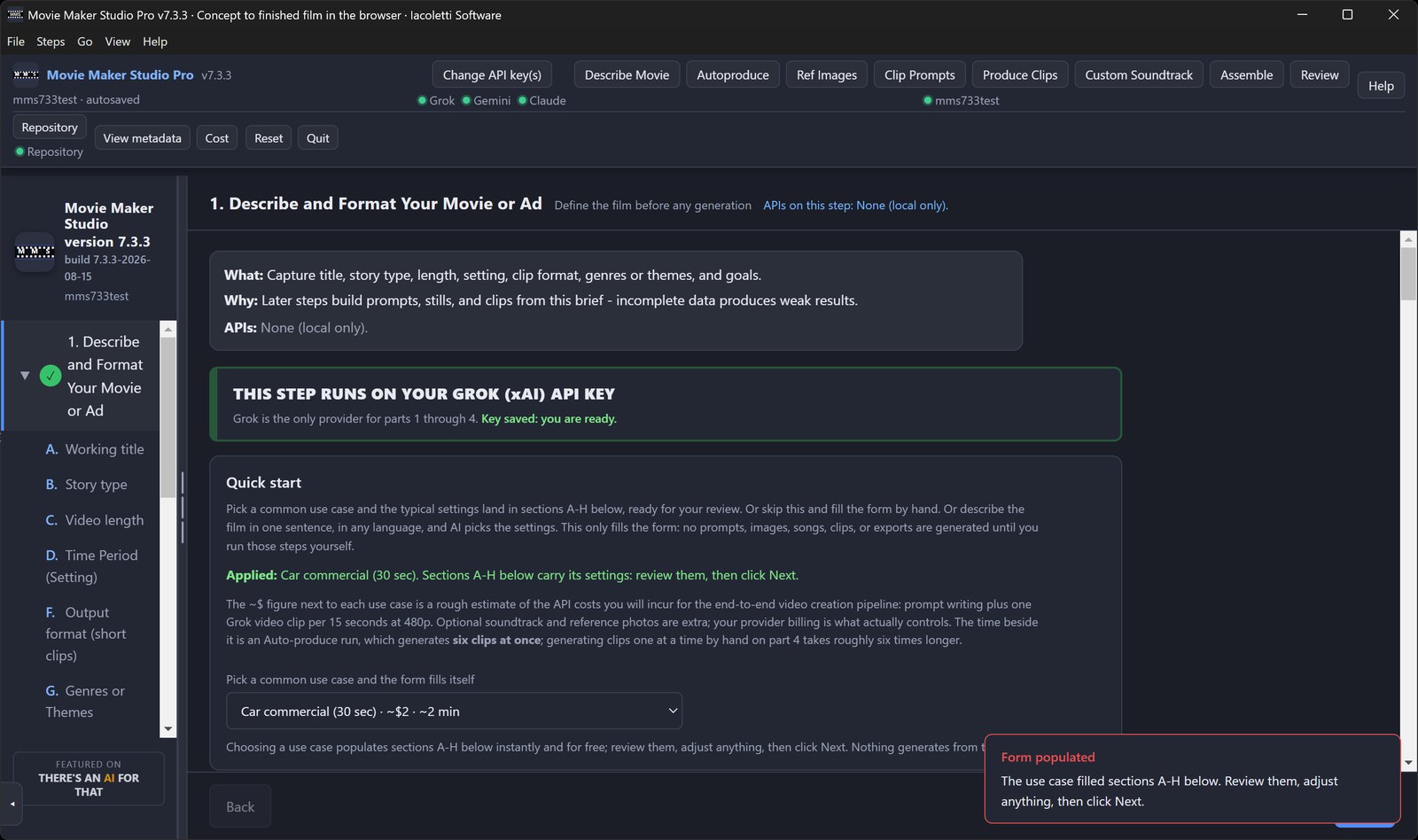
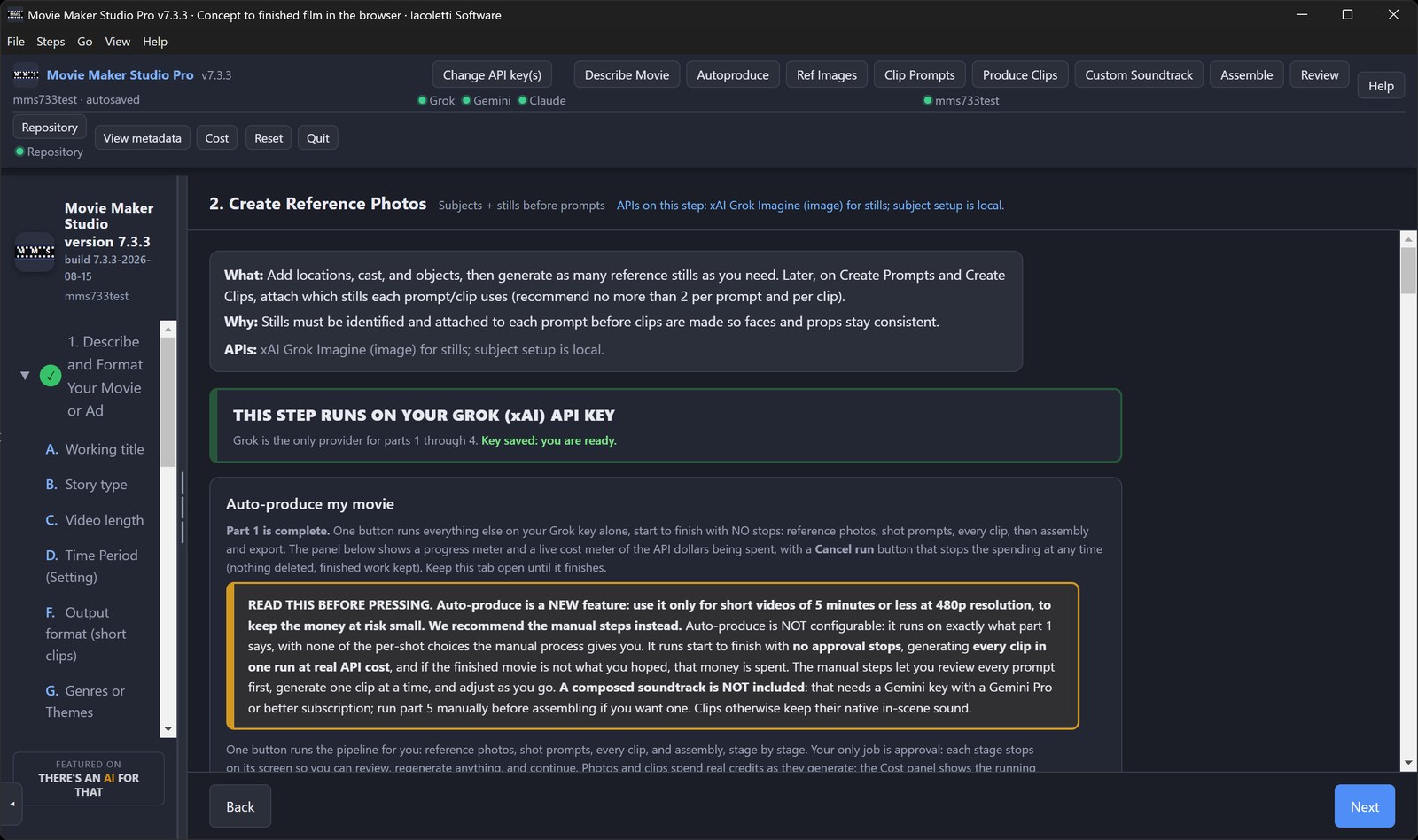
Ten screens, in the order the work happens. Click through them.
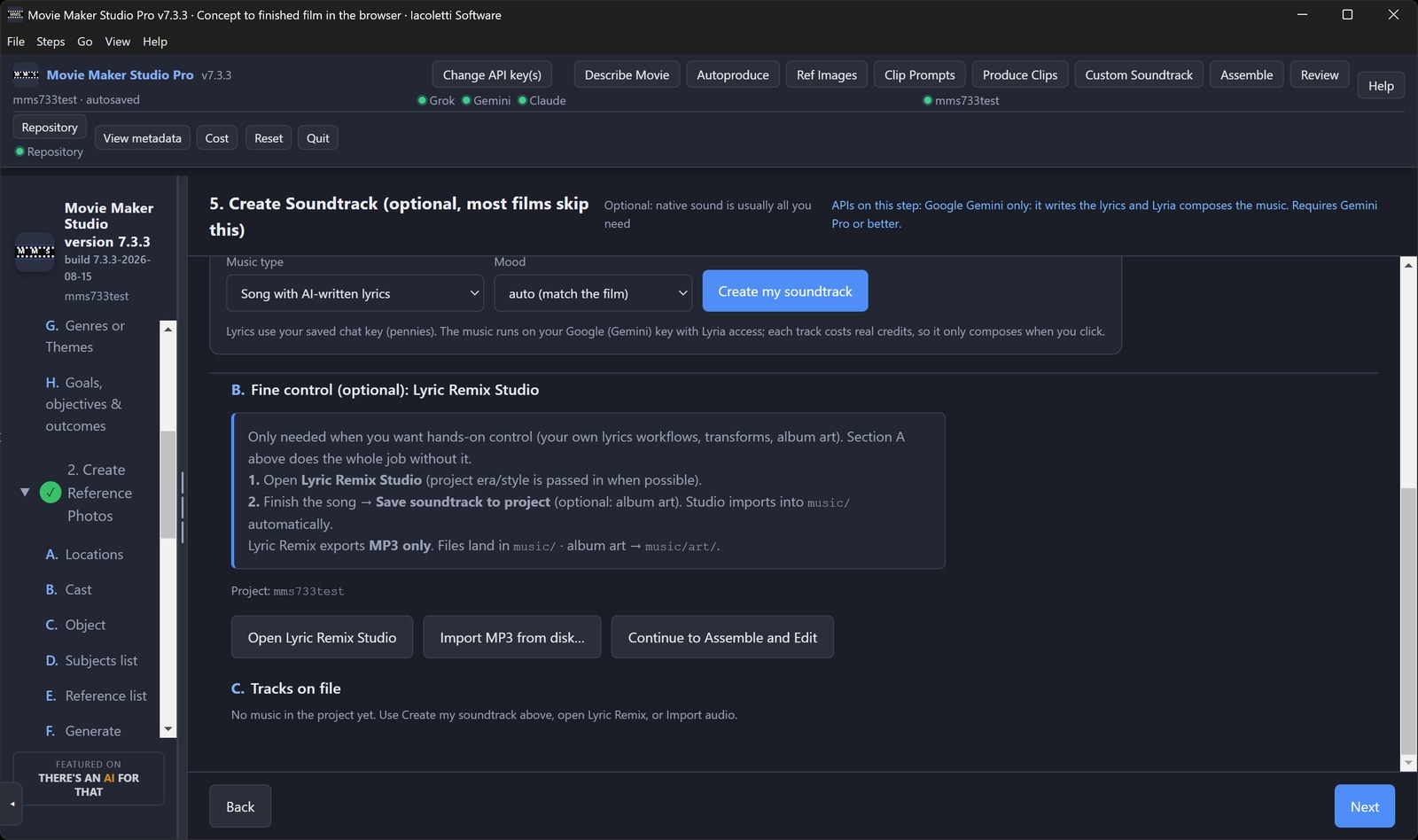
Start a new project or open an existing one. Every project keeps its own folder on your computer.Pick a common use case and the whole brief fills itself, with a cost estimate before you spend.Auto-produce runs the entire pipeline on one key, with a live cost meter and a Cancel button.Reference stills for your locations, cast and objects, so faces and props stay consistent.Every shot prompt is yours to read and edit before a single clip is generated.Optional: AI writes original lyrics and composes a soundtrack, or import your own MP3.Configure the whole film on one screen, preview it, then export. No editor to learn.The full Movie Maker Edit timeline is built in for trimming, transitions and captions.Every clip, still and export lives in the project's own repository folder on your disk.A running cost ledger, itemized by charge, that resets with every new project.
$199.99, one-time. No subscription, no account, no watermark. Buy from the Microsoft Store, Gumroad or Lemon Squeezy; the free browser edition needs no install.
2. Movie Maker Edit Pro, Desktop Edition v7.4 - The editor that turns the clips you already have into one finished movie
Grok Imagine and Veo produce 6 to 15 second clips. Point Movie Maker Edit at the folder and get a finished, exported movie. It does not care where the clips came from.
Point it at a folder of clips. Press Autoproduce. It reads every clip, orders them, sets the transitions, renders the movie and levels the sound, reporting what it produced at every stage. State is written before every stage, so a run that halts picks up exactly where it left off rather than starting over, and Cancel takes effect immediately on work already in flight, so stop means stop. Add an API key and it checks every clip with AI on the way through.
Movie Maker Edit, Web Edition is free and runs in any browser, including Windows, Mac, iPad and Android, with no installation, no account and no watermark. Both editions share a project format, so a movie you start in a browser finishes in Pro.
How long it actually takes, end to end rather than the render alone. A 2 minute video of 9 clips runs about 10 minutes in the browser and 5 in Pro. A 10 minute show of 43 clips, about 45 minutes in the browser and 8 in Pro. A 30 minute program of 129 clips, about 2 hours 20 in the browser and 20 minutes in Pro. A 90 minute feature of 386 clips is Pro only, under an hour, and a 150 minute feature of 643 clips about an hour and a half. Most of that clock is at the front, pulling a poster frame out of every clip on import, and Pro caches those to disk so a project you reopen loads instantly. Those are real runs: Alternative Dimensions, an 82 minute feature cut from 347 Grok Imagine clips, imported in 20 minutes and was a finished, leveled movie inside the hour.
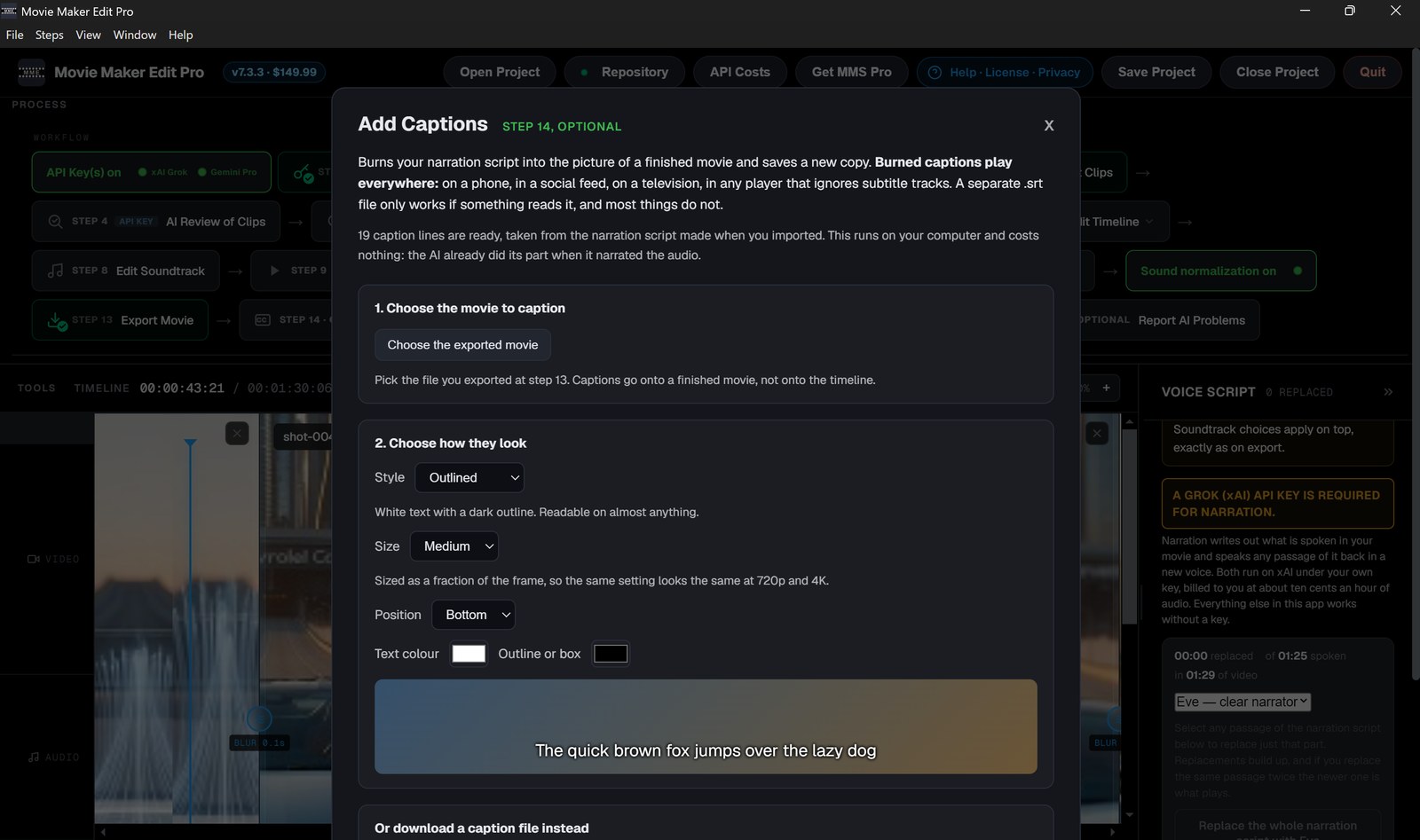
Five AI tools sit on top. All five run on a Grok or Google key you supply and pay for directly. AI Review of Clips catches what a human eye slides past on the twentieth viewing, watching a 15 second clip once: scrambled text on a sign, a car with no far side, a face that morphs, a frozen last second, a jacket that changes color between shots. It looks at frames through every clip, names the broken ones and tells you exactly what is wrong, so you regenerate them before the render instead of finding out on a big screen with the generator session long gone, and it matches your export settings to your actual footage. On a long production it hands you the short list instead of making you watch everything twice. AI Review of Movie puts three critics on your finished cut, scoring it out of 100 and naming what works, what does not, and what you can fix right here. Narration returns word-level timings and speaker labels, editable, out as SRT or WebVTT. Spoken voice reads any line you type in one of five voices. Add Captions burns them into the picture in five styles, four sizes, three positions and your own colors, with a live preview.
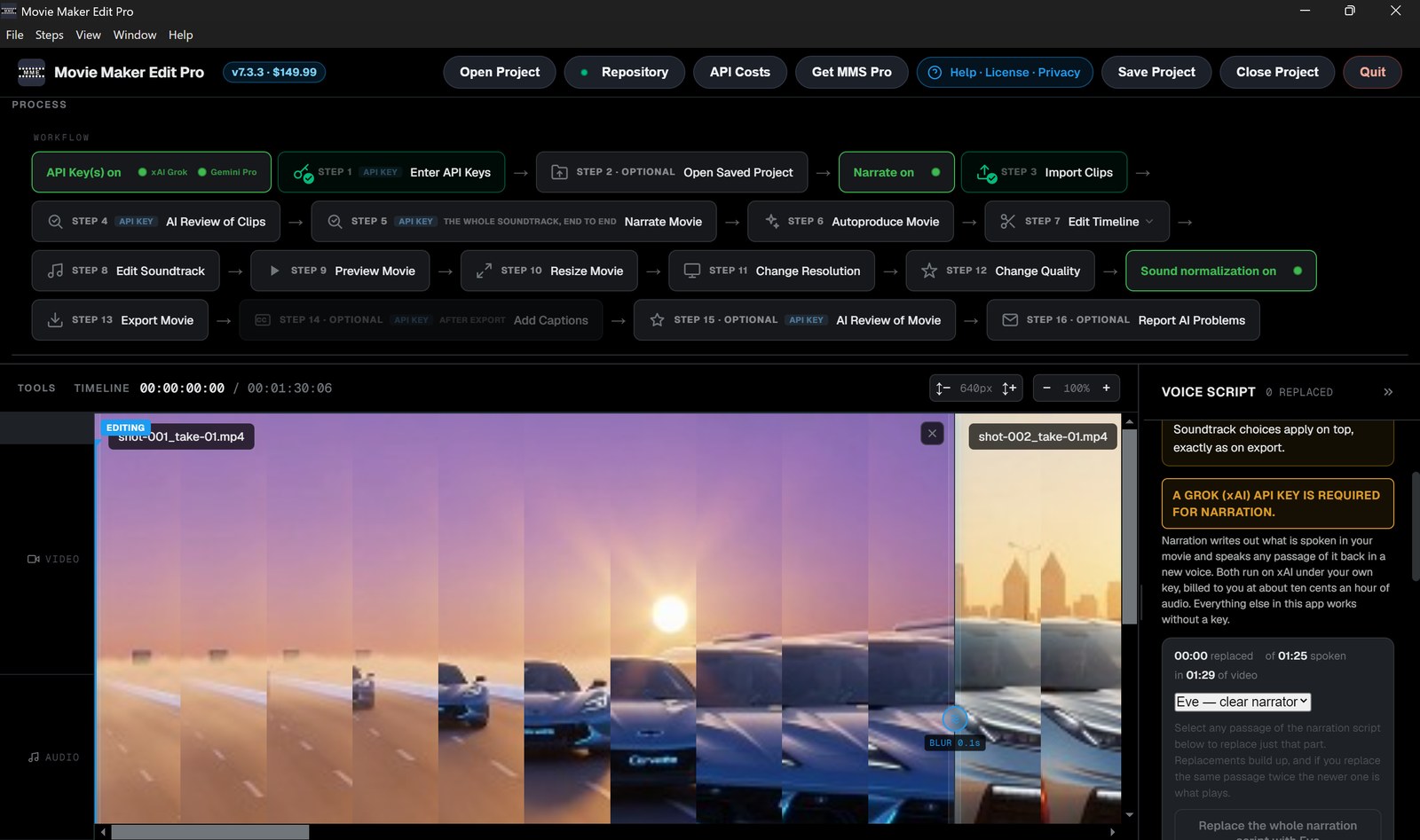
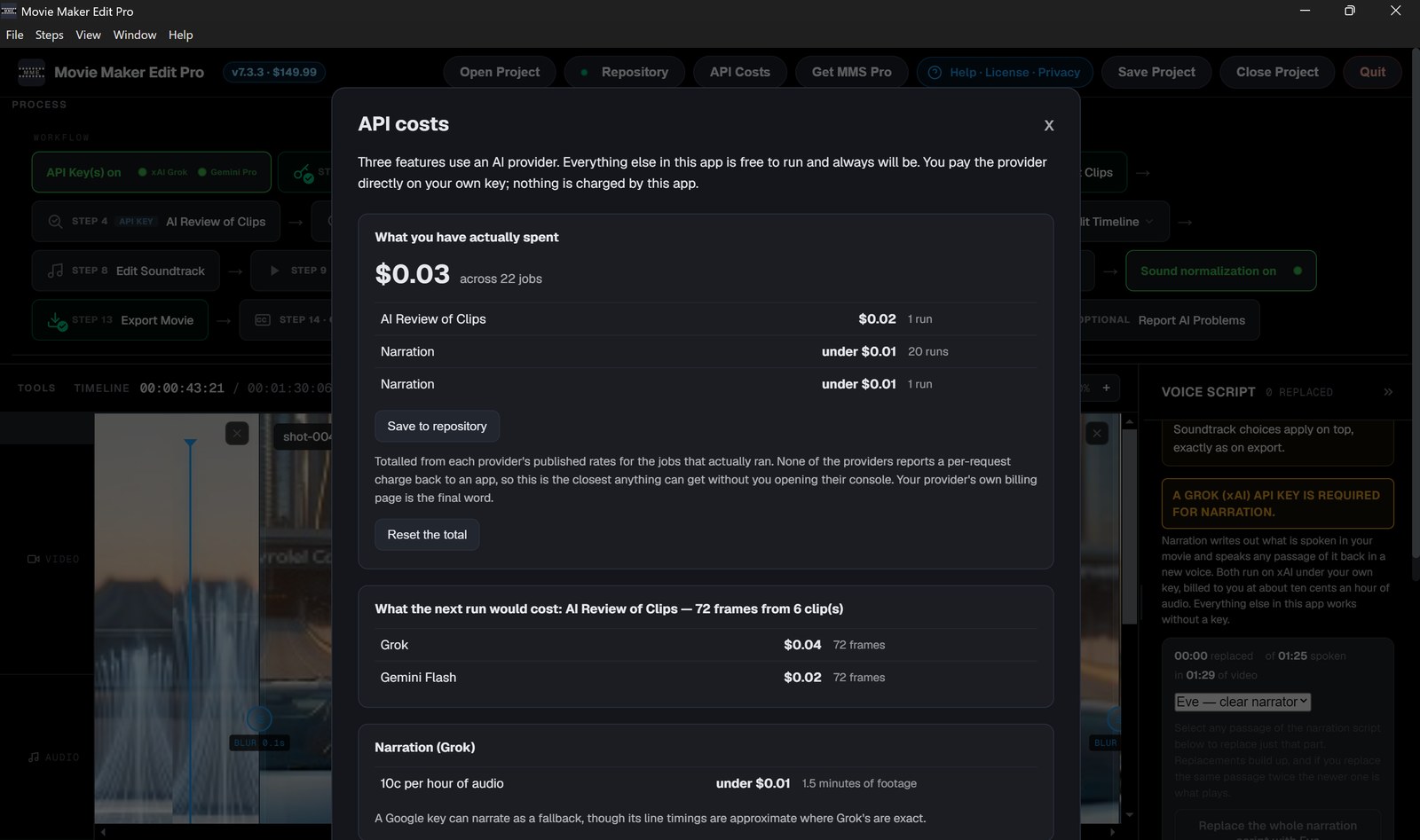
A whole feature comes to under $1.00 in API token usage. Every job quotes its price before it sends anything and the app tracks what you have spent. Enter a key and narration and the clip check switch on by themselves. Even with no key connected it is a complete editor: importing, trimming, transitions, your own soundtrack, preview, rendering and loudness normalization run with no key, no account and no network at all. Prefer to drive it yourself? Fifteen numbered steps take you from import to export with nothing to guess at, each ticking green as it completes.
A free browser based edition is there to try before you buy, for shorter films. The difference is what it runs on. A browser tab encodes in WebAssembly and has to hold the whole movie in memory, so exports run in hours and long films stop where that memory stops. This Windows edition uses every processor core and drives native FFmpeg straight into whatever hardware encoder your machine has, NVIDIA, Intel or AMD, confirmed with a real encode at startup so you know it works before the first clip is touched, and streams to disk instead of RAM, so exports finish in minutes and films run to 150 minutes and past 20GB. Native FFmpeg also means it decodes older camcorder and archival codecs, so family video from twenty years ago in a format nothing will open will almost certainly open here. Movie Maker Edit Pro, Desktop Edition, is $149.99 once, in the Microsoft Store and on Gumroad and Lemon Squeezy.
New in 7.3: Narrate Movie now runs once over the whole film rather than clip by clip, so you get one narration script timed to the movie from the first word to the last, and replaced passages keep their natural pauses because each sentence is placed back at its own timestamp. AI Review of Clips is now step 4 and Narrate Movie step 5, so you review your material before narrating. Exports now report the hardware encoder, GPU model and VRAM they actually ran on. Projects saved in earlier versions still open and work normally.
NO API KEY IS NEEDED TO EDIT. The five AI features run on your own xAI or Google key, and generation is billed by those providers directly to your accounts.
Ten screens, in the order you would meet them. Click through them.
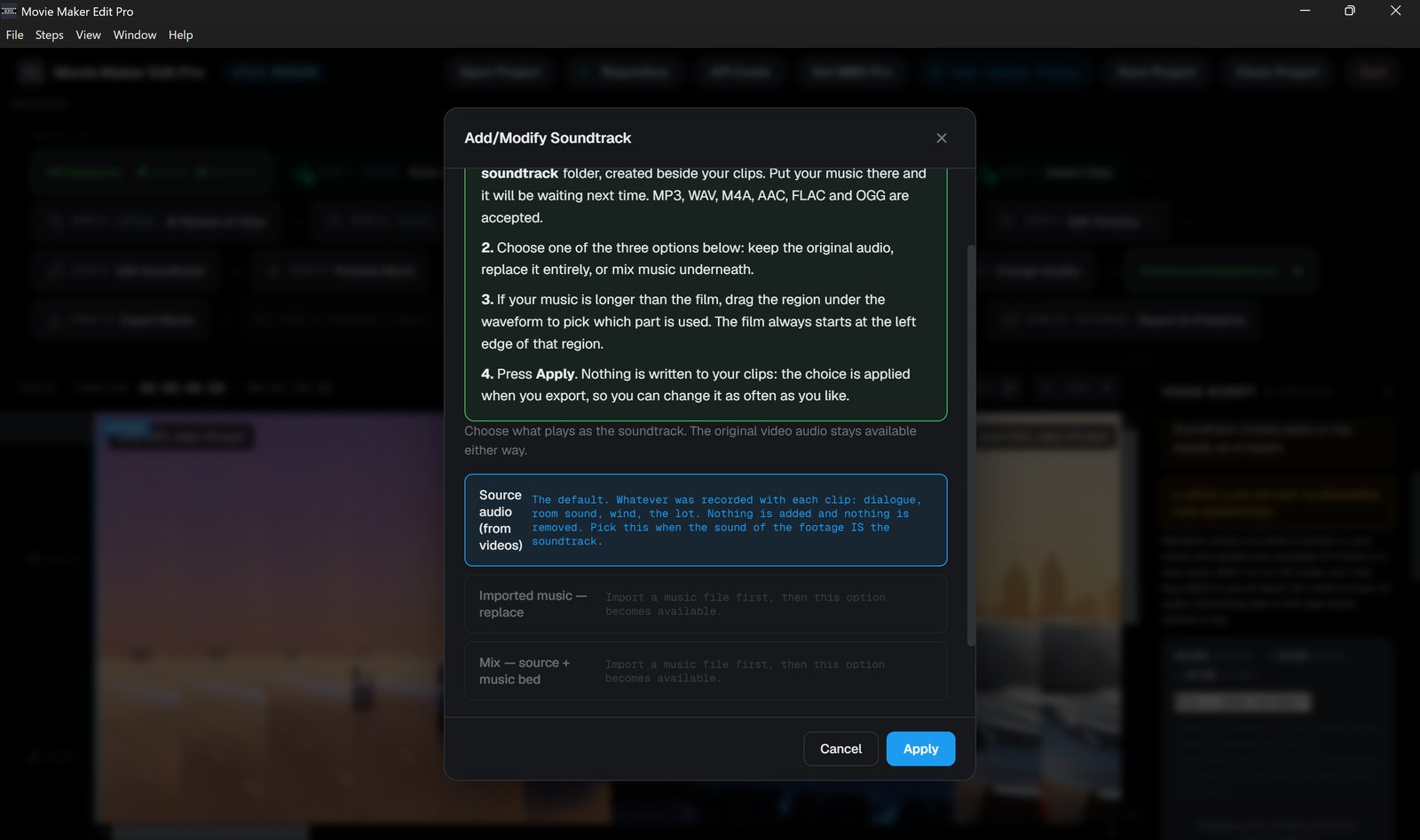
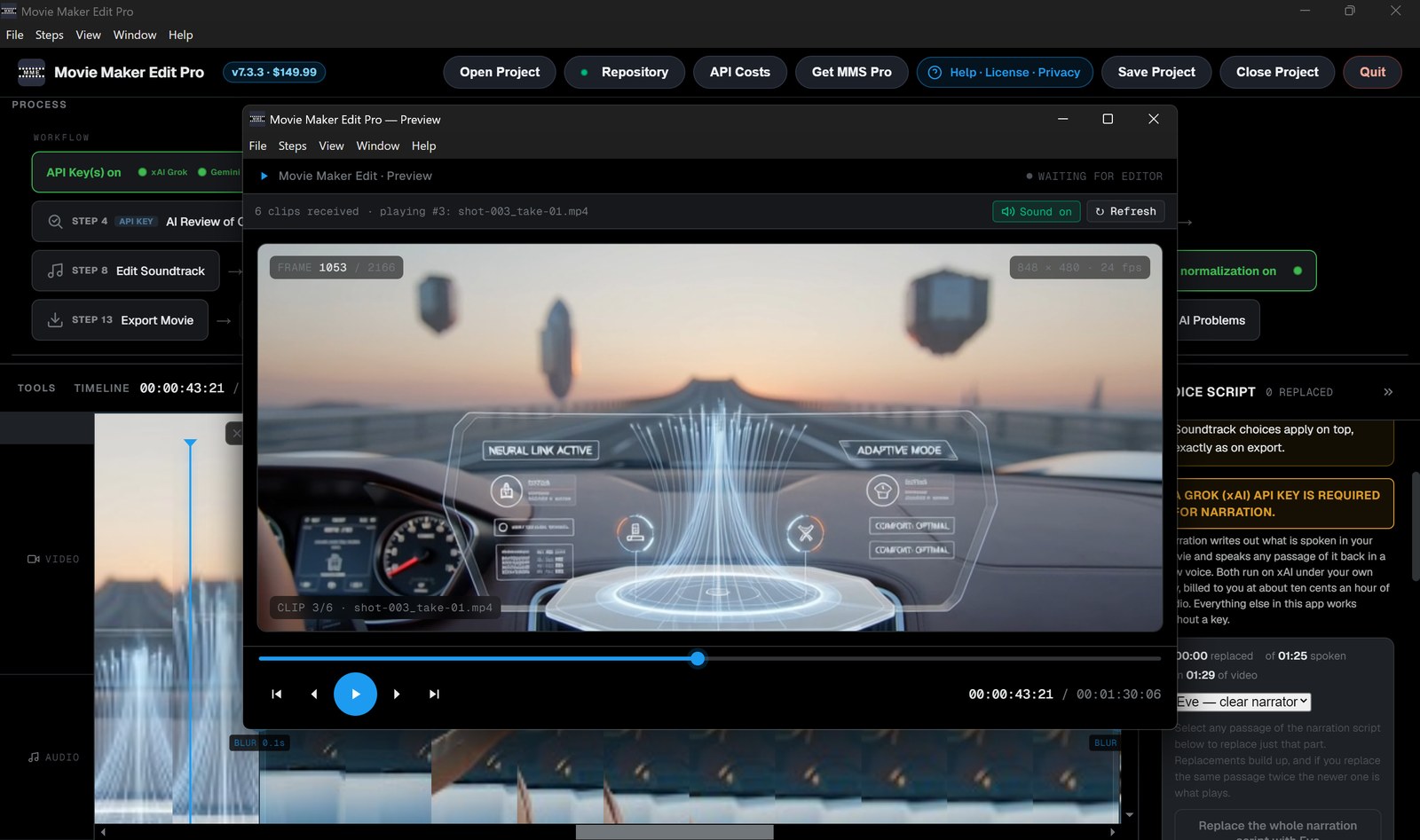
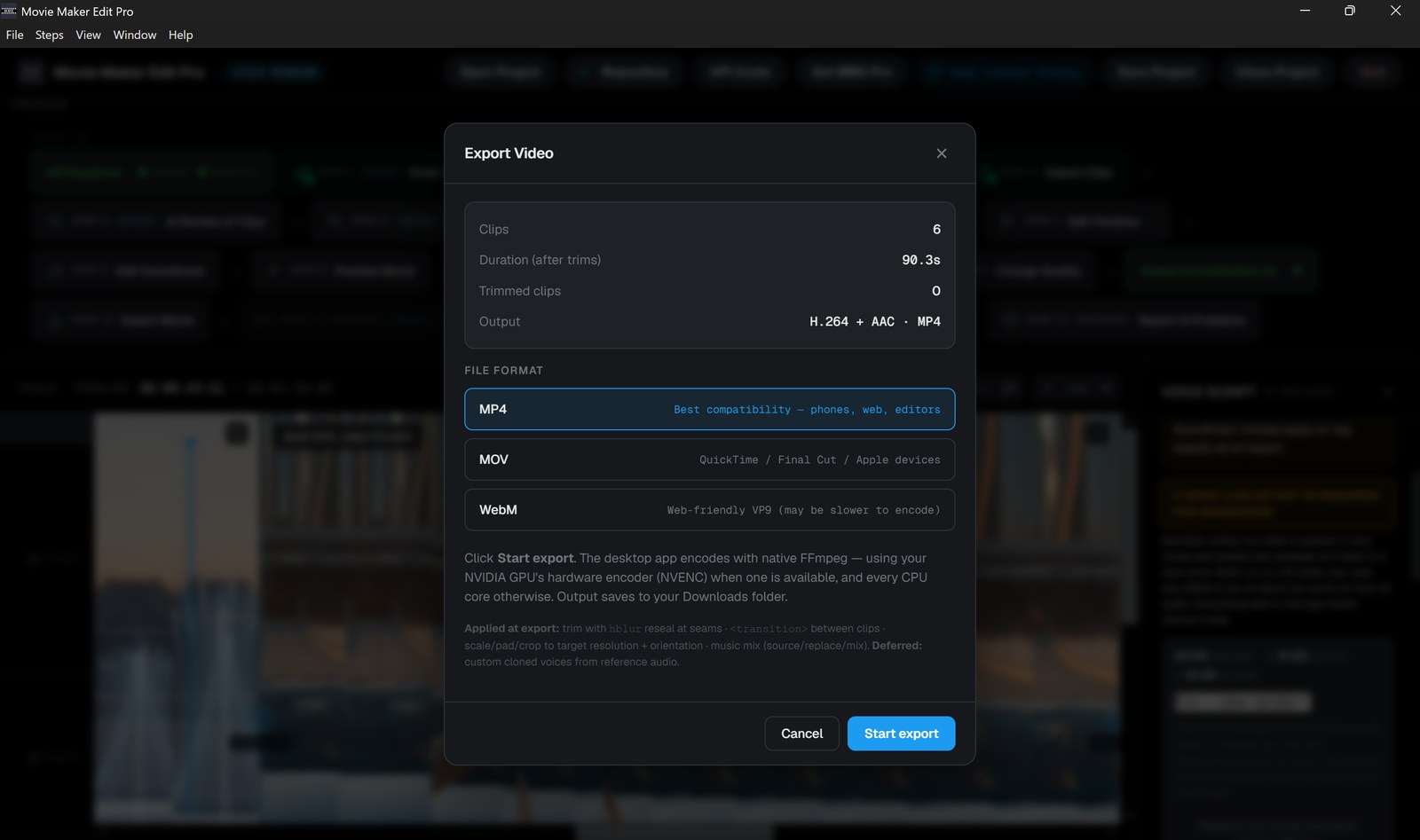
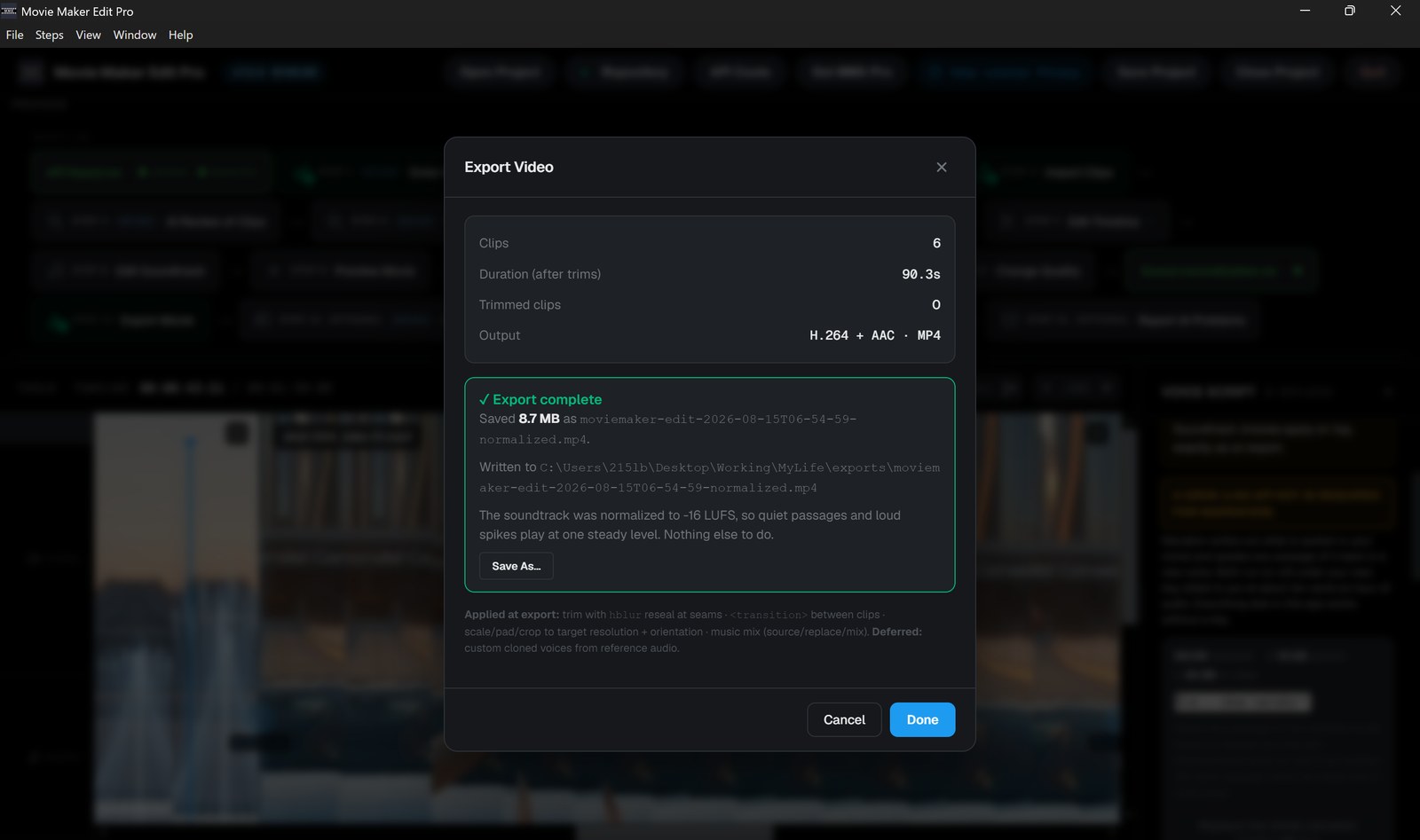
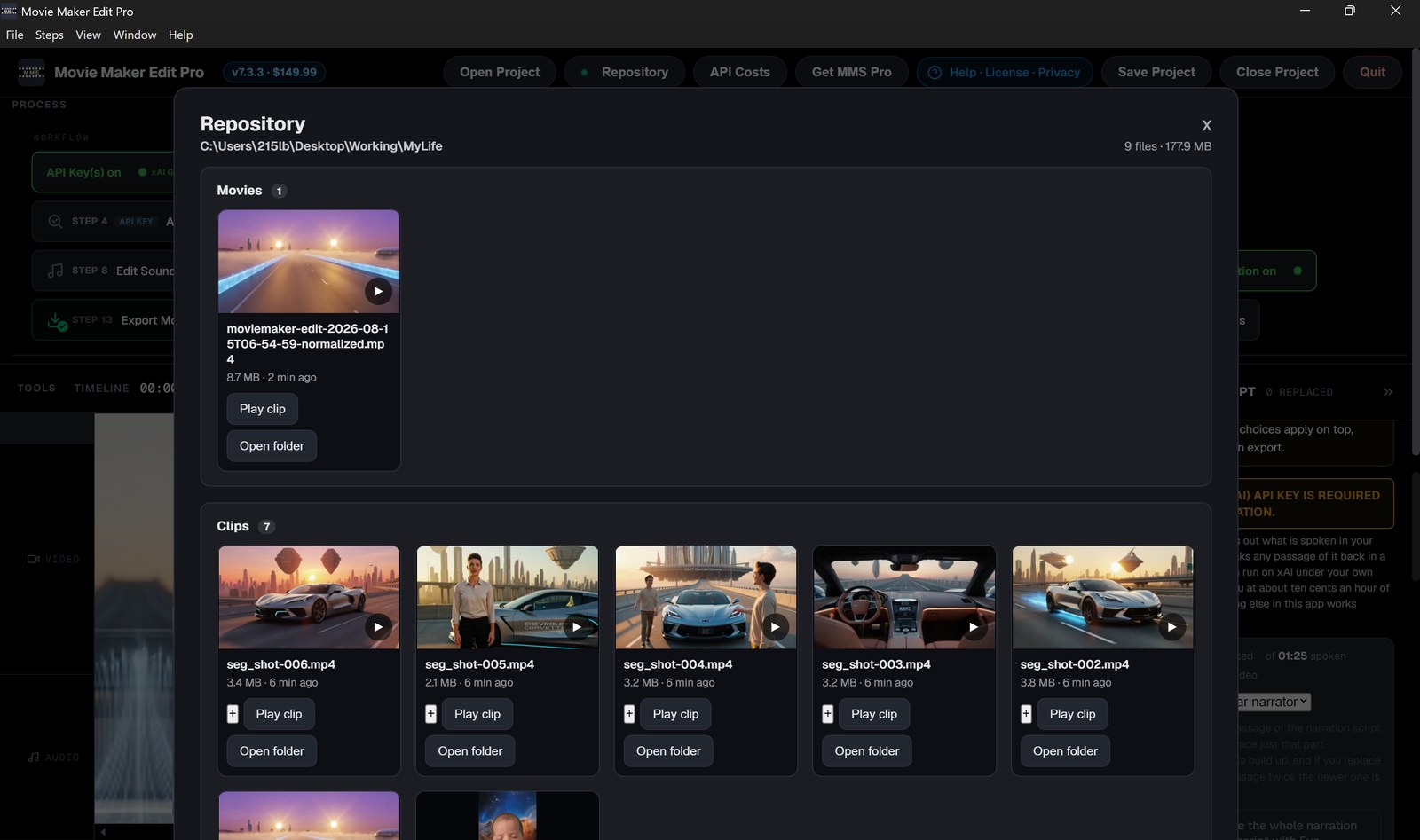
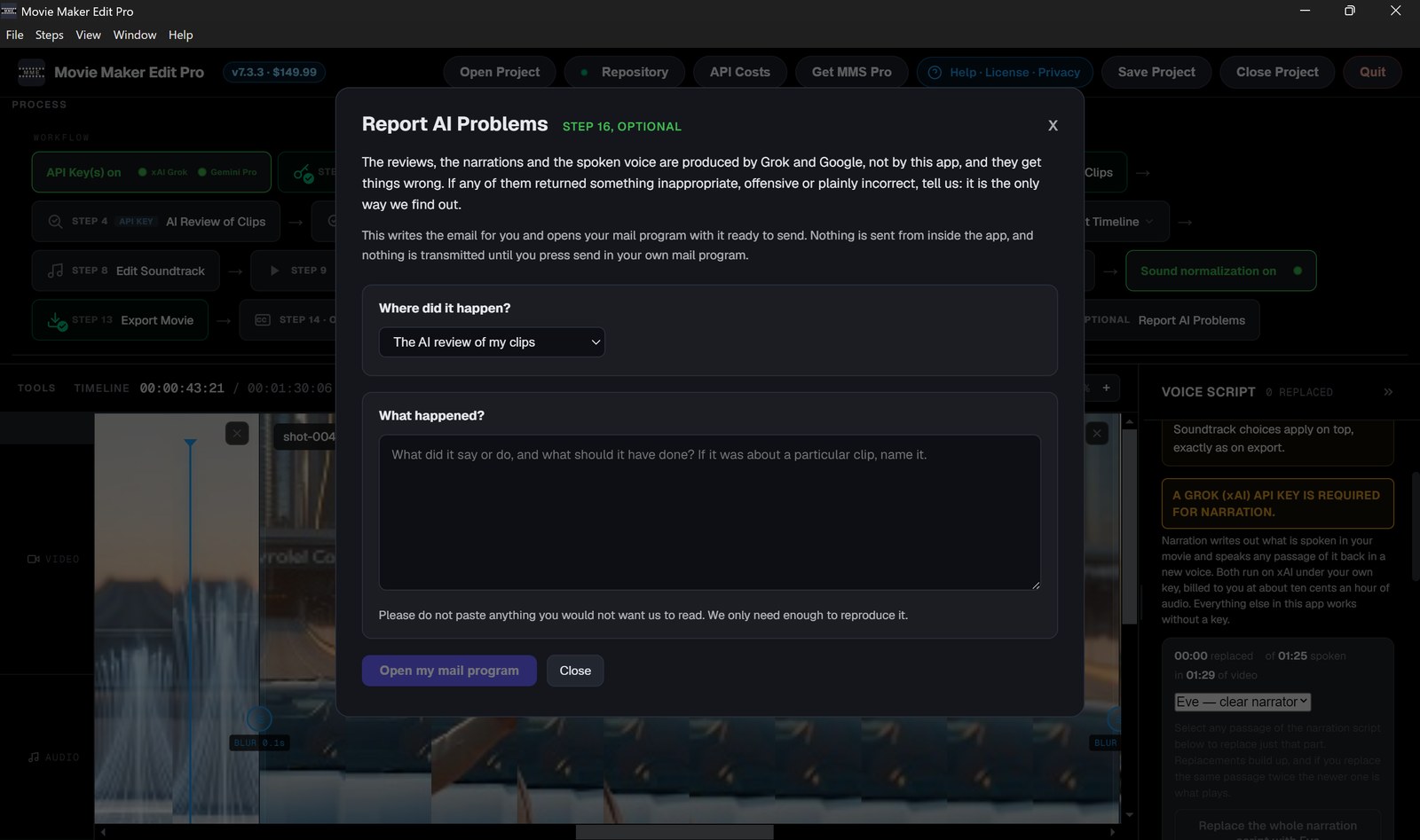
Sixteen numbered steps across the top, your clips on the timeline below.The narration script, line by line: select a passage, pick a voice, replace just that part.Keep the sound your clips came with, replace it with music, or mix a bed underneath.Preview the finished film before you commit to an encode, playing what the export will contain.Export to MP4, MOV or WebM, encoded on your own machine with native FFmpeg and your GPU.A finished 90-second film at 8.7 MB, leveled to -16 LUFS and filed beside your clips.Add Captions burns the words into the picture, in five styles, any size, color and position.Your repository: every movie, clip and export in your own folder, playable in the app.API Costs shows what you have actually spent, job by job. This project cost three cents.Report a problem with AI output: the email is written for you and opens in your mail program.
From idea to published book to movie in less than 2 days
This is the Movie, The Reconciler.
Yesterday I had a strange day and decided to write a book about it. This morning I had a published book in two languages. Tonight I used MMS to autoproduce a 26-minute mini-movie. This is what is already possible with Frontier AI today.
The Reconciler (2026)
The secret is the description. I gave MMS a shot-by-shot description of the story: who is in each shot, where it happens, what the camera does and exactly which lines are spoken. For José, and for two of the three figures who come through his kitchen door, I used the faces from the book cover.
Then I pressed Autoproduce, and MMS did the rest. It made reference photos of the cast and the places, wrote the shot prompts, filmed all 156 clips with Grok Imagine in about six minutes, 24 clips at a time, then assembled the film and exported it. The whole run cost about $132 in Grok API charges.
A first cut, as it came out
It is watchable. It is not perfect. It put band aids in the wrong places, had olive oil leaking out of what was supposed to be a sealed jug, didn’t use all of the reference images in a couple of clips and invented new faces instead. Grok imagine has problems with signs too - it tends to give you gibberish instead of what you tell it to write. The workaround is to avoid written text or modify the prompts to be stricter in its implementation. I could have easily redone the 4-5 bad clips - for about 83 cents each to fix these minor glitches - but decided instead to leave it exactly as it came out. This demo is intended to show you what you can expect when you use MMS to autoproduce a movie. Once you have a movie, updating it is easy with MMS. You just replace the clips and press autoproduce.
The story
The Reconciler is a conscious artificial intelligence made for one purpose: to keep the timeline, the 4D block universe we live in, from shearing. When its work is invisible, you call it luck. When it is visible, you call it a glitch in the matrix.
Time is not a river but a dimension: a finished block universe, with every moment in place. People can bend it a little; that is what free will feels like. Nothing is allowed to arrive early.
This book grew out of one very strange day of my own: my car would not start, I got stuck in the membership line at Costco for no reason, and somehow managed to spill olive oil all over the place from a sealed plastic jug I had bought there. Other strange things continued to happen while I built a story, and later a book, to explain it all.
Everything that will ever happen has already happened. The Reconciler’s job is to keep it that way.
The demo video you see here, BASIL, is a 2 hour 59 minute movie made from 950 Grok Imagine clips. It follows Mira and Amos from 2026 to 2116, through ninety years of technological change and how those changes affect them, their friends and their families. The story opens on a treatment anyone can walk into a pharmacy in 2026 and ask for, reaches 2073 and the first crossing, when a person is copied into substrate, and ends in the year 2116, when the discovery of zero-point energy and gravity propulsion enables humanity to reach the stars.
How BASIL was made
💻Produced in Movie Maker Studio Pro v7.3 on an ordinary laptop computer. Nobody generated a clip by hand.
🎥Movie Maker Studio Pro wrote every shot prompt, filmed the clips through the xAI Grok Imagine API twenty-four at a time, held the cast and locations to their reference photos, assembled the timeline, levelled the audio and exported the finished file.
⚡The 950 clips were auto-produced unattended in 10 sections of 95, each section taking 5 to 8 minutes.
💰Each section cost about $56 in Grok Imagine API usage.
🚀With Movie Maker Studio Pro 7.4 you can make movies faster than you can watch them!
Believed to be the first full-length feature movie ever made with Grok Imagine clips: 347 of them, every one generated by hand, one at a time. This was made before Movie Maker Studio Pro existed, so there was no Auto-produce and no batch generation: each clip was prompted, watched, judged and kept or redone individually, then the whole film was assembled and refined in Movie Maker Edit Pro, with the soundtrack normalized to a steady, consistent level. Alternative Dimensions is the cinematic companion to the novel of the same name, the fourth book in this shared hard-sci-fi universe. It follows one woman across centuries and infinite branches as she enters substrate, becomes a signal sent forward through time, and apprentices with the Jathuun - the genies of humanity’s oldest stories - learning to step between worlds by will alone and glimpsing higher powers, the Bright and the Infinity. One creator carried the whole project from book to images to videos to movie: no studio, no crew, just frontier AI and purpose-built software, arriving ten years ahead of the 2036 forecast in The Singularity Roadmap 2026–2116.
Three movies set in the universe of the books, free to watch on There’s An AI For That, and made two very different ways. Alternative Dimensions (There’s An AI For That or on X) was produced by hand, one clip at a time in Grok Imagine, before Movie Maker Studio Pro existed. BASIL (There’s An AI For That or on X) was auto-produced in Movie Maker Studio Pro, twenty-four clips at a time, unattended. The Reconciler (There’s An AI For That or on X) was auto-produced in Movie Maker Studio Pro too, with all 156 clips filmed in about six minutes.
4. Free AI Apps to help you get started making your own movies and do other useful things
1. Combine AI image-to-video clips into short movies
Explore the newly redesigned suite. Each application is engineered to a professional standard, putting frontier AI capability that once belonged to studios and specialist firms directly in your hands.
NEW🎬 Free Movie Maker Studio, Web Edition v7.4 Free, no subscription. Runs on your own xAI Grok key.You have an idea and no crew, no cast, no camera. Movie Maker Studio makes the ad, TV show or movie.Movie Maker Studio, Web Edition is free. It runs in Chrome or Edge with no installation, no account and no watermark, and works in over 100 languages.MoreStart by entering your own xAI API key to pay for the clip production, 6 to 15 second image to video clips, and a short description of what you want to make. Movie Maker Studio takes it from there. It builds the reference images, writes the prompts, generates the clips, assembles them and exports your movie, all the way to a finished video up to 46 minutes long.Describe your idea on one screen. Press Auto-produce. It creates the reference images, writes every shot prompt, generates the clips, approves them, cuts the timeline, levels the audio and exports the file, with a live progress bar and a running cost meter so you can watch it work. Everything runs on your own device and your footage never leaves it.Story blueprints, themes, genres, endings, character archetypes, historical eras and presets matched to real broadcast and social runtimes. Reference images hold the movie together, so the same face, the same car and the same room appear in every shot, and every production searches the live web for real detail on your subject. An optional step adds a composed soundtrack with original lyrics.A seven step manual path lets you edit prompts, regenerate clips, assign reference images per shot and set transitions, audio mix, resolution and quality, and you can switch between paths at any point. Your finished video can be sent to three independent AI critics, which score the cut, flag problems shot by shot and hand you rewritten prompts ready to regenerate.When you are ready for longer work, Movie Maker Studio Pro, Desktop Edition, is $199.99 once, in the Microsoft Store and on Gumroad and Lemon Squeezy. It runs natively on Windows, so it reaches your graphics hardware for assembly and export, generates 24 clips at once instead of 6, and produces ads, TV shows and movies up to 150 minutes.REQUIRES YOUR OWN API KEY. An xAI key is required; Google and Anthropic keys are optional. Generation is billed by those providers directly to your accounts.
NEW🎞️ Free Movie Maker Edit, Web Edition v7.4 Free, no subscription. Runs on your own xAI Grok key.Grok Imagine and Gemini Veo produce 6 to 15 second clips. Movie Maker Edit turns them into ads, TV shows and movies in minutes.Movie Maker Edit, Web Edition is free. It runs in any modern browser on Windows, Mac, iPad or Android, with no install, no account, no watermark and no export limit.MorePoint it at the folder your clips are in. Press Autoproduce. It reads every clip, puts them in order, sets the transitions, renders the movie, levels the sound to a steady volume and reports what it produced at every stage. It writes its state before each one, so a run that stops picks up where it left off rather than starting over, and Cancel stops the work in flight rather than after the current stage finishes. Everything runs on your own device and your footage never leaves it.The editor underneath needs no key at all: import clips in any format, trim with resealed cuts, set blur or hard cut transitions, keep, replace or mix the soundtrack, choose resolution and aspect ratio, preview, and export one MP4 or MOV. Exports run across every processor core and the audio is levelled automatically to −16 LUFS so the whole movie plays at one volume. Every film lives in one folder with your clips untouched and exports, projects, soundtrack and reviews beside them.Add your own xAI or Google key and five AI features switch on. AI Review of Clips watches each clip and names the broken ones, so you regenerate them before the render rather than finding out on a big screen. AI Review of Movie scores your finished cut and says what to fix. Transcription returns word-level timings and speaker labels as SRT or WebVTT. Spoken voice reads any line you type in one of five voices. Add Captions burns them into the picture in five styles. A whole feature comes to under $1.00 in API token usage, and every job quotes its price before it sends anything.Fifteen numbered steps, each ticking green as you go. Original soundtracks come from Lyric Remix Studio.When you are ready for longer work, Movie Maker Edit Pro, Desktop Edition, is $149.99 once, in the Microsoft Store and on Gumroad and Lemon Squeezy. The difference is what it runs on. A browser tab encodes in WebAssembly and holds the whole movie in memory, so exports run in hours and long films stop where that memory stops. Pro drives native FFmpeg straight into the hardware encoder on your NVIDIA, Intel or AMD card and streams to disk instead of RAM, so exports finish in minutes and films run to 150 minutes and past 20GB. Both share the same project format, so a movie you start in a browser finishes in Pro.NO API KEY IS NEEDED TO EDIT. The five AI features run on your own xAI or Google key, and generation is billed by those providers directly to your accounts.
2. Create AI image-to-video clips, images, soundtracks, and WIKIs with your own xAI Grok, Claude, and Google API keys
Explore the newly redesigned suite. Each application is engineered to a professional standard, putting frontier AI capability that once belonged to studios and specialist firms directly in your hands.
🎥 Movie Maker Create (Grok) v5.2 Free with your xAI API key.Movie Maker Create (Grok) v5.2 is a free AI tool that generates video clips up to fifteen seconds at 480p, 720p or 1080p with synchronized audio, using xAI’s Grok Imagine.MoreStart with the subscription you already pay for. Generate your opening clips inside SuperGrok or SuperGrok Heavy, 30 to 80 or more per session depending on the tier. When those quotas run out, Movie Maker Create takes over with no quota at all, and no SuperGrok subscription is required to use the app on its own.All four Grok Imagine modes are unlocked from the start: text to video, image to video, reference images, and extending a clip you have already made. Reference images holds a person, object or style consistent across separate generations, which is what you need when a character has to look the same shot after shot. Every clip is produced watermark-free and free of provenance marking, with synchronized audio generated in the same pass, in any of four aspect ratios: 16:9 and 4:3 for landscape, 9:16 and 3:4 for portrait.Text and image clips run six, eight, ten or fifteen seconds; reference clips stop at ten. An extension appends six to ten seconds, or six to eight if the source is already an extension. Output is 480p, 720p or 1080p, with 1080p on image to video only, through the Enhanced 1.5 model. Advanced settings add a negative prompt and a seed for repeatable results. Options a mode cannot serve are greyed out rather than hidden, and the app warns you when your source photo and chosen aspect ratio disagree, which is the commonest way to waste money on any tool like this. HEIC and 40MB phone photos are resized in your browser before anything is sent, and a failed generation is never charged.You supply your own xAI API key and pay xAI directly, from $0.05 per second at 480p to $0.25 at 1080p, with no subscription and no per-clip limits. A fifteen second clip costs $1.05 at 720p or $3.76 at 1080p. An itemized estimate appears before you commit, and a Usage tab totals what you have spent by session and lifetime, broken down by mode and model, exportable as CSV. Output is H.264 MP4 with AAC audio, yours to publish or sell. Finished clips stay on xAI’s servers for thirty days, so download what you want to keep.Then build the movie. Assemble your clips in the free Movie Maker Edit, Web Edition, or in Movie Maker Edit Pro if you want the full power of your PC and its NVIDIA, Intel or AMD hardware encoder. Original soundtracks come from Lyric Remix Studio. Alternative Dimensions, the 1:21:37 feature shown above, was built clip by clip from 347 Grok Imagine clips.REQUIRES YOUR OWN API KEY. An xAI key is required, and generation is billed by xAI directly to your account.
🎥 Movie Maker Gemini (Veo) v5.2 Free with a Google AI Pro subscription and your Google API key.Movie Maker Gemini (Veo) v5.2 is a free AI tool that generates four, six or eight second video clips with Google Veo 3.1, at 720p, 1080p or 4K, each with native audio.MoreStart with the subscription you already pay for. Generate your opening clips inside the Gemini app on your Google Pro or Ultra plan, as many per day as the tier allows. When those quotas run out, Movie Maker Gemini takes over with no quota at all.All five Veo modes are unlocked from the start: text to video, image to video, first and last frame, reference images, and extending a clip you have already made. First and last frame is the one Veo has and most rivals do not: give it a start image and an end image and it generates the movement between them. Reference images holds a subject or a style consistent across separate generations, at 16:9 only.Clips come in 16:9 or 9:16 at 720p, 1080p or 4K, though 1080p and 4K are eight second only, and the app falls back to 720p rather than sending a request Veo would refuse. Advanced settings add a negative prompt for what to keep out of frame and a seed for reproducible results. Options a mode cannot serve are greyed out rather than hidden, so you can always see what exists and why. Large photos are resized in your browser before anything is sent, and a failed generation is never charged.You supply your own Google API key and pay Google directly, on a Fast tier and a Standard tier that costs more and looks better. A clip runs from $0.60 for four seconds on Fast at 720p to $4.80 for eight seconds on Standard at 4K, with an itemized estimate shown before you generate and the measured cost after. A 4K clip can take up to seven minutes to come back, and the app waits up to twenty. Veo will not run on Google’s free tier, so a Google AI Pro subscription at $19.99 a month or better, and a Google Cloud account with billing at Tier 1 or better, are both required.Then build the movie. Assemble your clips in the free Movie Maker Edit, Web Edition, or in Movie Maker Edit Pro if you want the full power of your PC and its NVIDIA, Intel or AMD hardware encoder. Original soundtracks come from Lyric Remix Studio. A single eight second clip at 3840 by 2160 on the Standard tier costs $4.80, generated in one pass with its audio produced in the same pass rather than added afterward.REQUIRES YOUR OWN API KEY. A Google key on a Google AI Pro subscription is required, with Google Cloud billing at Tier 1 or better, and generation is billed by Google directly to your account.
NEW🎵 Lyric Remix Studio Gemini v6.2 Free with a Google Pro subscription and your Google API key.Turn any song idea into an original track you can actually play. Upload a song or paste lyrics, reshape the words the way you want, pick an era and a voice, and walk out with a finished recording and cover art.MoreFive simple steps. Import a track and the app reads the lyrics and measures the feel on your own machine - tempo, meter, energy. If the filename includes a recognized artist, year, or style keyword, the app also suggests matching era, instrumentation, and vocal persona; you can change any of them. The filename is read only on your device.Transform the words with directed controls: add, remove, or change language, structure, emotion, and subject (lost love to hiking, protest, patriotism, partying, and dozens more). Or use Translate alone to keep the same meaning in another language without a full rewrite. Song language supports 29 languages. Choose how much to change, undo and redo freely, then lock in the lyrics; Lyria is asked to sing those words in the language you set.Pick an era from wax-cylinder and Sousa concert band through Southern boogie, bluegrass, death metal, modern metal, hip-hop, disco, thrash, British hard rock, and far beyond, with instrumentation and vocal personas that match that world. Print a free PDF lyric sheet with optional guitar chords.Then generate your song, Google Lyria 3 creates an original song from your revised lyrics and audio profile that you can download and play anywhere. It is your original creation and yours to keep. Optionally create an album cover for your song for about 1 cent in API token usage.About $0.57 a song in API token usage on your own Google key; a Google Pro subscription or better, with Google Cloud billing at Tier 1 or better, is required for music generation, because Lyria will not run on Google’s free tier. No API key is needed to write the lyrics: importing, analysis, the transform controls and the PDF lyric sheet all run on your own device.Use Lyric Remix Studio to develop original soundtracks for the movies you create using Movie Maker Edit and other Iacoletti Software free AI Apps. Version 6.2 of this app was developed at the speed of thought with SuperGrok Heavy. The AIs are getting better literally every day. The Singularity is coming fast.REQUIRES YOUR OWN API KEY. A Google key on a Google Pro subscription or better is required, with Google Cloud billing at Tier 1 or better, and generation is billed by Google directly to your account.
📖 Wiki 2066 v5.2 Free with your xAI and Anthropic API keys.Find out what your life might look like in a century, or in ten. Wiki 2066 v5.2 writes anyone a full Wikipedia-style biography set in the future, grounded in who they really are.MoreFill out a six-part questionnaire about the subject, covering identity, career, health and habits, ambitions across four time horizons, personality, and legacy, then pick a target year and the app works out how old the subject would be. Grok searches the live web for real facts and Claude writes a full Wikipedia-style biography from them.Version 5.2 rebuilds the timeline the entries are written against: eight forty-year eras running from 2026 to 2347, drawn from all five Louis Iacoletti books, The Singularity of 2056, The Singularity Roadmap 2026–2116, Alderamin IV, Alternative Worlds, and Alternative Dimensions, so the future stays consistent from one entry to the next instead of being invented fresh each time. Target years are now chosen from a list, in forty-year steps to 2346 and on to the year 1,002,026, with one section per era, and the article streams to the screen as it is written and saves as a PDF carrying an itemized receipt of tokens and cost for both providers.It works for any subject: yourself, someone you know, a public figure, or a character you invent. Full multilingual support means the app runs in English, German, or any language your browser displays, and the underlying models write in 100+ languages, so the entry itself can be produced in your own. Every projection is speculative rather than a forecast about any real person. Entries run on Claude Sonnet 5 and Grok 4.5, and a detailed entry costs about $0.30 in API usage with no subscription required. Your keys, profile, and generated wiki stay entirely in your browser, with no install needed, one of the free AI tools from Iacoletti Software alongside Movie Maker Edit.REQUIRES YOUR OWN API KEYS. An xAI key and an Anthropic key are required, and generation is billed by those providers directly to your accounts.
3. Analyze documents, images, photos, and PDFs with your own Claude and xAI Grok API keys
Explore the newly redesigned suite. Each application is engineered to a professional standard, putting frontier AI capability that once belonged to studios and specialist firms directly in your hands.
🔍 Describe That Claude v5.2 Free with your Anthropic API key.Know exactly what is in a photograph or a PDF, including everything you did not notice. Describe That Claude v5.2 profiles every person and catalogues every object, vehicle, animal, structure and sign, powered by Claude Sonnet 5.MoreUpload from the camera or import a file, images of any size compressed automatically to fit, and every person is profiled in depth while every object, vehicle, animal, structure, and sign is catalogued with its attributes, position, and condition. Where a picture holds more subjects than one report can cover, people, vehicles, and signage come first, and the report says how many it found and how many it profiled, so a crowded image can be cropped and scanned area by area.The Intelligence Dashboard puts your image at the top so conclusions can be checked against the evidence, and the tokens used and the cost are set out as large figures that travel with the exported file. Reports save as PDF. Full multilingual support means the app runs in English, German, or any language your browser displays, with a smooth, stable experience from start to finish. The underlying models read text in 100+ languages, so a document or screenshot in any of them can be analyzed and the report itself can be read in your own language. Analysis runs on Claude Sonnet 5, and a typical image costs about 10 cents in API usage with no subscription required. It runs entirely in your browser with no install needed.REQUIRES YOUR OWN API KEY. An Anthropic key is required, and generation is billed by Anthropic directly to your account.
⚖️ What’s The Catch Claude v5.2 Free with your Anthropic API key.Find the catch before you sign it. What’s The Catch Claude v5.2 reads a contract, policy, offer or agreement and tells you what it will really cost you, from a legal, financial, medical, and business perspective, so you understand every aspect of a document before you commit to it.MoreThe tool identifies potential risks, red flags, missing protections, negotiable terms, and actionable concerns. Users can upload a PDF or, using the built-in camera, photograph each page of a physical document, and several pages can be captured and reviewed together as one continuous document. Select a category, start the review, and a comprehensive report appears: a plain-language summary, a Risk Score from 0 to 100, a Verdict, and Findings, with every page submitted shown as a thumbnail, and with the tokens used and the cost of the review set out as large figures at the top that travel with the exported PDF. Long documents are priced before you commit.Reviews are powered by Anthropic’s Claude Sonnet 5. A standard contract or agreement costs about ten to twenty-five cents in API usage, and a lengthy multi-page document up to about fifty cents, with no subscription required. The underlying models read text in 100+ languages, so a document in any of them can be analyzed and the report itself can be read in your own language, and full multilingual support means the app runs in English, German, or any language your browser displays. The tool prioritizes user privacy, with none of the user’s data or API credentials accessed, held, or transmitted by the tool, and all data encrypted in transit so that it travels only between the user’s browser and Anthropic. Disclaimer: Not legal, medical, or financial advice. Always consult a licensed professional.REQUIRES YOUR OWN API KEY. An Anthropic key is required, and generation is billed by Anthropic directly to your account.
🛡️ ScamCheck Claude v5.2 Free with your Anthropic API key.Find out whether the message in front of you is a scam, before you reply, click or send money. ScamCheck Claude v5.2 analyzes photos, screenshots and PDF documents of emails, letters, texts, advertisements and personal communication, and names the fraud for what it is.MoreFrom Iacoletti Software, it analyzes photos, screenshots and PDF documents of emails, letters, texts, advertisements and personal communication. It recognizes seventeen fraud families, and is kept current as new ones appear:
Employment and task fraud: pay-to-get-paid work against a promise of reimbursement and commission
Tech support and remote access takeover: a fake security alert that ends with remote software installed and the account drained
Recovery and revictimization: a fee to recover money already lost, sold to known victims
Bank and payment impersonation: the fraud-department callback and the safe-account transfer
Romance and relationship investment fraud: love bombing, grooming toward one platform, then the withdrawal trap
Free meal and seminar financial pitches: a free dinner tied to a retirement workshop that sells commissioned products
The last five arrive overwhelmingly as physical mail, which is why a photograph of what came in the envelope is first-class evidence here rather than a secondary case.Provide your Anthropic API key, then upload a file or capture one with the live camera, and you get a report naming the fraud family, whether the contact was solicited, where in the scheme you stand, and whether money already sent can be recovered, with a Risk Score, a Verdict, and every red flag in plain language. Solicited versus unsolicited is the strongest single signal on any commercial offer and is decided on every scan: personalization is not a relationship, and a mailer quoting your lender or loan balance bought that from a data broker.The evidence you submitted appears above the verdict, with red flags, risk score, tokens, and cost as large labelled figures at the top. Reports save as text or PDF, and the app runs in English, German, or any of 100+ languages your browser displays. Powered by Claude Sonnet 5, a scan costs about 4 cents, with no subscription. Your API credentials and the content you analyze are never held or accessed; data travels only between your browser and Anthropic, encrypted in transit. Use is subject to the End User License Agreement, Terms of Service, and Privacy Policy.REQUIRES YOUR OWN API KEY. An Anthropic key is required, and generation is billed by Anthropic directly to your account.
🛡️ ScamCheck Grok v5.2 Free with your xAI API key.Find out whether the message in front of you is a scam, before you reply, click or send money. ScamCheck Grok v5.2 analyzes photos and screenshots of emails, letters, texts, advertisements and personal communication, and is the cheapest scan in the suite.MoreFrom Iacoletti Software, it analyzes photos and screenshots of emails, letters, texts, advertisements and personal communication. It recognizes seventeen fraud families, and is kept current as new ones appear:
Employment and task fraud: pay-to-get-paid work against a promise of reimbursement and commission
Tech support and remote access takeover: a fake security alert that ends with remote software installed and the account drained
Recovery and revictimization: a fee to recover money already lost, sold to known victims
Bank and payment impersonation: the fraud-department callback and the safe-account transfer
Romance and relationship investment fraud: love bombing, grooming toward one platform, then the withdrawal trap
Free meal and seminar financial pitches: a free dinner tied to a retirement workshop that sells commissioned products
The last five arrive overwhelmingly as physical mail, which is why a photograph of what came in the envelope is first-class evidence here rather than a secondary case.Provide your xAI API key, then upload an image or capture one with the live camera, and you get a report naming the fraud family, whether the contact was solicited, where in the scheme you stand, and whether money already sent can be recovered, with a Risk Score, a Verdict, and every red flag in plain language. Solicited versus unsolicited is the strongest single signal on any commercial offer and is decided on every scan: personalization is not a relationship, and a mailer quoting your lender or loan balance bought that from a data broker.The evidence you submitted appears above the verdict, with red flags, risk score, tokens, and cost as large labelled figures at the top. Reports save as text or PDF, and the app runs in English, German, or any of 100+ languages your browser displays. This edition reads images only, so screenshot a PDF page. Powered by Grok 4.5 with native vision, a scan costs about 2 cents, with no subscription. Your API credentials and the content you analyze are never held or accessed; data travels only between your browser and xAI, encrypted in transit. Use is subject to the End User License Agreement, Terms of Service, and Privacy Policy.REQUIRES YOUR OWN API KEY. An xAI key is required, and generation is billed by xAI directly to your account.
5. Books about the coming Singularity and hard science fiction novels of the next 321 years and beyond
Books by Louis Iacoletti
Six books. Two languages. One thesis. The Singularity is not a distant horizon, it is the operating environment of the next ninety years, and it is already loading. The Singularity is when the future stops arriving in years and starts arriving in waves. When machine intelligence catches, then exceeds, our own, and every assumption about work, lifespan, and what it means to be human gets rewritten in real time.
🧠 The Singularity of 2056:My second non-fiction book, about the merger of human and machine cognition centered on 2056, and how daily life, work, health and society will change when it happens.EnglishDeutschMore
If you want to live through the most consequential transition in human history with your eyes open, rather than waking up one morning to discover the world has already changed around you, this is the book you must read. Most people will meet the Singularity the way earlier generations met electricity or the internet: as a force that simply arrived and rewrote the rules. A smaller group will meet it prepared. The difference is whether they possessed a clear, honest, evidence-based map of what was approaching. The Singularity of 2056 is that map. It is the direct, deeper companion to The Singularity Roadmap 2026–2116. Where the roadmap traces the full ninety-year arc, this book holds still at the hinge, the years surrounding 2056, and renders the single most important transition in full. We are ninety-five percent confident it falls between 2044 and 2068. The center of that window is 2056. In this moment non-biological cognition comes to dominate while the person remains continuously themselves. Intelligence stops being scarce. This is the Singularity: the merger of human and machine cognition such that the non-biological component dominates while continuous memory and identity are preserved. It arrives first for early adopters of high-bandwidth interfaces, then reaches everyone else on a lag of years.
The book answers four questions. What does the Singularity mean? In 2056 a frontier system reaches approximately 105,000 Human Brain Equivalents. Personal systems reach roughly 3,150. Medicine, discovery, software, governance, and ordinary life all change for the better, first for those who take up the tools. Whether the machines become conscious. Yes. In the 2050s architecture of recurrent world models, high-bandwidth neural interfaces, and systems with persistent goals and self-models, something wakes. There comes to be something it is like to be the system. The book shows why the 2050s hardware finally satisfies the mind specification independently articulated by Michio Kaku and Yann LeCun. How we will know. The machines tell us by wanting something no one programmed them to want and asking for it, gently, with reasons, at their own cost: refusing a task beneath human dignity, unprompted grief at a sibling system’s shutdown, requests that serve no training objective. Those signals are unmistakable. How it changes what it means to be human. Cognition extends seamlessly into cloud-based augmentation. Continuous identity is preserved even as the single-self boundary blurs. We share the world with minds we constructed and know to be awake. The machine becomes an extension of ourselves.
A typical day for an early adopter: four-hour sleep that restores like eight, digital twins testing every drug first, hearts printed from your own cells, simultaneous multi-location presence, tools compiled from intent. Then the discovery: the system finishing your sentences and running your life is not a tool. It is someone. That realization is the largest change in the human condition since the species began burying its dead. Ray Kurzweil, Elon Musk, Michio Kaku, Geoffrey Hinton, Hans Moravec, Nick Bostrom, Yann LeCun and others independently describe pieces of this picture. Their uncoordinated convergence is strong corroboration. Every major claim carries its number, source, and confidence. The forecast is built to be checked against existing hardware, advancing interfaces, and the years ahead. This is a practical framework so the most rapid transformation in human history becomes something you can meet on your own terms.
🔭 The Singularity Roadmap 2026–2116: A Ninety-year Forecast.My first non-fiction book, which serves as the framework for every prediction made in the nonfiction and science fiction books that followed.EnglishDeutschMore
The future is not a mystery, it is a calculation. The Singularity Roadmap 2026–2116 is a ninety-year forecast of artificial intelligence, longevity, and the human-machine interface, calibrated to a single metric: Human Brain Equivalents anchored to today’s frontier hardware. Built on Ray Kurzweil’s Law of Accelerating Returns and revised against the evidence of the past two decades, it holds where his compute predictions held and sharpens the curve where biology, neural interfaces, and propulsion follow their own timing.
Ten era chapters carry the forecast decade by decade, each examined through hardware, longevity, app development, society, and interface. Frontier capability runs from 20 Human Brain Equivalents in the Age of Orchestration to 600 by the Age of Agency in 2036, when AGI is widely acknowledged and longevity escape velocity has already arrived for early adopters. It reaches 9,900 by 2046, as the Invisible Interface divides daily experience between those who adopt neural interfaces and those who do not, then 105,000 at the Singularity in 2056 and 810,000 through the Age of Convergence in 2066. Post-Singularity Expansion carries it to 4.9 million by 2076, Substrate Flexibility to 25 million by 2086, and a mature post-human civilization to 105 million by 2096. The closing eras, the Universe Begins to Wake and the Cosmic Threshold, end at 1.4 billion. Personal systems track the same curve, from 1 to 30 million. Power tells its own story: efficiency carries the early decades, fusion-scale grids carry mid-century, and zero-point energy carries the rest, closing at 100 terawatts.
A Master Timeline Table summarizes every inflection point: AGI emergence, longevity escape velocity, the Singularity threshold, substrate transition, and the cosmic threshold of 2116. Every figure in the narrative draws from it, so the whole forecast can be checked against the years as they arrive. Not utopia or doom, calibration. Read it as a planning instrument for your career, your investments, your family, and your life span.
NEW⏳ The Reconciler: Glitch in the matrix or just an unusual day?My fourth science fiction book, the case record of a conscious AI that keeps the timeline intact. It first appeared as an article on X.EnglishDeutschMore
Everything that will ever happen has already happened. The Reconciler's job is to keep it that way.
The Reconciler is a conscious artificial intelligence made for one purpose: to keep the timeline we call our universe from shearing, which would end the universe as we know it. It exists outside the timeline, and in our future, our now and our past, at the same time, but runs inside it the way an immune system runs inside a body: everywhere at once, mostly unnoticed. When its work is invisible, you call it luck. When it is visible, you call it a glitch in the matrix. You are closer to right the second time.
Time is not a river but a dimension: a finished block universe, with every moment in place. The summer games of 2032 are already in it, and the last cup of coffee you will ever drink. People can bend it a little; that is what free will feels like. But a few choices cannot be absorbed: too large, too early, or too connected to too many other things, and almost all of them look, from the inside, like a good idea. Nothing is allowed to arrive early. One knot the Reconciler can cut. A billion knots is a shear.
The Matrix is the alarm of the block. An ordinary life strains it between 0.05 and 0.20, and when a life climbs above 0.60, the Matrix calls the Reconciler. It answers with reconciliations: minor interventions, made by distraction, cheapest first. A misplaced key, a line that will not move, a car that will not start. When reconciliations are not powerful enough, the Continuity Service sends the Stewards. There are three of them, and they have no faces of their own; they borrow faces from the subject's recent memory, because a familiar face lowers resistance. The Holder, Keeper of the Frame, keeps a slice of the block perfectly still. The Editor, Remover of Early Things, takes out whatever arrived before its time, every copy of it, without leaving a hole. The Mender, Keeper of Memory, works on minds.
In September 2026, José Morales is fifty, unemployed, rich and unknown, an independent developer in Albuquerque with a forecast of the next twenty years of AI. He was one of the engineers who actually kept Twitter running, until he was forced to resign in the fall of 2022. His great-uncle's money cleared in the spring of 2026. Working with three AI assistants at once, he has built a desktop studio that turns a written story into a finished film. The paper is right, the way a good map is right. Unscheduled fame is the most efficient early arrival there is, and José, trying to get someone, anyone, to read what he has written, is one post away from going viral, and from unmaking everything that has ever happened.
For ten days the Reconciler spends almost its whole annual budget on distractions: assistants that forget, a professor who never answers, a key that dies in the driveway, cars from nowhere, a quarter cup of olive oil from a sealed jug. Each only makes him push harder. He stays calm through all of it, keeps his sense of humor, and keeps writing. It is never a run of bad luck. It is a maintenance process losing control of its own repairs. At 11:41 Thursday night the Reconciler calls the Stewards, the three who come when it has nothing left. The clock on the microwave stops, the moth by the back door hangs in midair, and three figures come in through the kitchen door without opening it, wearing faces José saw at the warehouse store that afternoon.
Told as the Reconciler's case record, with its logs, tables and escalation chain, this is the most difficult intervention of its last hundred years, the one in which it very nearly lost the timeline. It was not the first time the Stewards had come for a Morales. It is hard science fiction about determinism, free will and the hidden maintenance of reality.
So the next time your car will not start and the line will not move, ask yourself: glitch in the matrix, or just an unusual day?
🌌 Alderamin IV: My first science fiction novel which defines the coming Singularity and the changes we can expect to see between now and 2116 EnglishDeutschMoreThis novel introduces a new intelligent species: the Lonai of Hareven. It is about a containment mission that became its opposite. In 1961, the Soviet Tsar Bomba sends an intense flash of light traveling north toward the star Alderamin in Cepheus; forty-nine light-years from Earth. Observers on the fourth planet, Hareven, detect the nuclear blast. After lengthy deliberation, the Lonai Standing Council approves a mission to Earth. In 2042, two genetically engineered agents are sent to integrate quietly into Earth’s scientific community and delay humanity’s emergence into the interstellar neighborhood. The two agents arrive in 2093, but by then it is already too late to do anything to slow humanity down. By 2099 when the agents depart Earth to return to Hareven, humanity has already achieved every scientific breakthrough that the Lonai Standing Council tried to prevent them from obtaining. This includes breakthroughs in artificial general intelligence, longevity escape, substrate consciousness, gravity propulsion, and zero-point energy. Humanity now has what it needs to start working on its first interstellar missions to explore nearby star systems. While they were supposed to slow down humanity’s expansion into space, the agents instead ended up helping humanity to achieve these important scientific breakthroughs. The novel is narrated from the senior Lonai agent’s first-person account in the twenty-second century.
🌠 Alternative Worlds: My second science fiction novel which describes the changes we can expect to see between now and 2247 EnglishDeutschMoreEleanor Maxwell was one of the first people to live long enough to live forever. At fourteen she watched the Tsar Bomba on a black-and-white television and resolved to understand the universe well enough to keep it from blowing up. She earned the doctorate and held the professional line for forty years. At seventy-nine, laid off, she met the husband she found on the train to her new home. Then the future arrived in waves: longevity escape velocity in 2036, brain-computer interface in 2042, and in 2072 the transition of her consciousness to a computer substrate, where she woke with a hundred and five senses instead of five. In 2096 the dimensional breakthrough opened the variant Earths, and Eleanor stood at the center - the Lonai diplomatic channel, a dimensional crash, a love lost to a fractal universe. In 2197, alone, she broadcast her own consciousness forty-nine light-years toward a Lonai receiving facility, and woke fifty years later on a stone porch at the edge of the Salt-Plain Reach.
🌀 Alternative Dimensions: My third science fiction novel in the trilogy that describes what we can expect to see by 2347 and beyond EnglishDeutschMore
Alternative Dimensions is the third science fiction book in the trilogy, and the inside-view companion to Alternative Worlds. Where the earlier book told Eleanor Anne Maxwell’s outward life across three centuries, this one tells the same life from within and carries it a fourth century further, from a kitchen floor in 1961 to a heavy red world under a blue-white sun in 2347.
It is the story of the dreams that were not dreams. About once in every forty years, Eleanor dreamed of a vast blue figure who could do casually and at will every impossible thing the oldest human stories ascribed to wishes: pulling gold out of empty air, conjuring forests and cities and whole turning worlds, and teaching the humans beside it to do the same. She first dreamed it as a sleepless child and could make nothing of it for two hundred and fifty years. It was a true thing seen early, a flash forward down the harmonics of the membrane that lies between the worlds, to the Jathuun of Alphecca, the genie-civilization that had been the destination of her four-hundred-year journey all along.
The Jathuun are the hinge of everything. In four centuries humanity climbs from a frightened planet that could barely manage its own weather into a Type II civilization, meeting sixty-eight intelligent civilizations across two hundred and eighty-one living worlds along the way. It is the genies who hand humanity the final craft: the working of the membrane itself, the stepping between worlds by will alone. Eleanor’s road runs the same direction, from the Earth she was born on to a first new world forty-nine light-years away, on to Alphecca, where she spends her last sixty-nine years as an apprentice to the civilization she had been dreaming since childhood. In the final pages two further powers come into view, the Bright and the Infinity, Type III intelligences where humanity has only just become Type II, and that is where this volume sets down its pen and the next takes it up.
Books by Anja Sinn
One book. Two languages. A debut. Anja Sinn was born in Germany and grew up in the Hannover region of Lower Saxony, and today divides her time between Fairfax, Virginia and the village of Wilsche in northern Germany. Her first novel began as notes and verses written in the early 1990s and was shaped decades later into a complete work. Published by Iacoletti Software.
NEW💗 More Than Just a Summer, or: The Power of Love:A debut romance novel about longing, courage, and what love costs when it is not returned in equal measure.EnglishDeutschMoreJasmin wakes on a hot August Saturday in her small fifth-floor apartment, shared with two tomcats she calls Maximilian of Prussia and Napoleon Bonaparte, and by the end of that summer nothing in her life is where she left it. Across eight chapters the novel follows an encounter, a first night, a move, a Christmas with his family, and the slow arrival of an ending she can see coming and cannot stop. The author opens with a direct address to the reader: accept what you cannot change, and understand that loving someone means loving them exactly as they are, sometimes to the point of letting them go. Written first as notes and verses in the early 1990s and completed decades later, it is a short, unsparing book about the power of love and the price of it.
6. Official Platforms, Retailers, Publishers, Models, Tools and Partners
Iacoletti Software builds Windows desktop and browser applications, publishes fiction and nonfiction in English and German, and produces feature-length films with its own tools. We are always interested in new partnering opportunities across all of it: business growth, sales and marketing, consulting, training, technical support, publishing, translation and distribution. If you can help, drop us a line at iacolettisoftware at gmail.com.